Copyright © 2006, 2007, 2008, 2009 Peter Johnson
2009
Abstract
This document is the user manual for the Yasm assembler. It is intended as both an introduction and a general-purpose reference for all Yasm users.
Table of Contents
- Preface
- I. Using Yasm
- II. NASM Syntax
-
- 3. The NASM Language
- 4. The NASM Preprocessor
-
- 4.1. Single-Line Macros
- 4.2. String Handling in Macros
- 4.3. Multi-Line Macros
-
- 4.3.1. Overloading Multi-Line Macros
- 4.3.2. Macro-Local Labels
- 4.3.3. Greedy Macro Parameters
- 4.3.4. Default Macro Parameters
- 4.3.5.
%0: Macro Parameter Counter - 4.3.6.
%rotate: Rotating Macro Parameters - 4.3.7. Concatenating Macro Parameters
- 4.3.8. Condition Codes as Macro Parameters
- 4.3.9. Disabling Listing Expansion
- 4.4. Conditional Assembly
-
- 4.4.1.
%ifdef: Testing Single-Line Macro Existence - 4.4.2.
%ifmacro: Testing Multi-Line Macro Existence - 4.4.3.
%ifctx: Testing the Context Stack - 4.4.4.
%if: Testing Arbitrary Numeric Expressions - 4.4.5.
%ifidnand%ifidni: Testing Exact Text Identity - 4.4.6.
%ifid,%ifnum,%ifstr: Testing Token Types - 4.4.7.
%error: Reporting User-Defined Errors
- 4.4.1.
- 4.5. Preprocessor Loops
- 4.6. Including Other Files
- 4.7. The Context Stack
- 4.8. Standard Macros
-
- 4.8.1.
__YASM_MAJOR__, etc: Yasm Version - 4.8.2.
__FILE__and__LINE__: File Name and Line Number - 4.8.3.
__YASM_OBJFMT__and__OUTPUT_FORMAT__: Output Object Format Keyword - 4.8.4.
STRUCandENDSTRUC: Declaring Structure Data Types - 4.8.5.
ISTRUC,ATandIEND: Declaring Instances of Structures - 4.8.6.
ALIGNandALIGNB: Data Alignment
- 4.8.1.
- 5. NASM Assembler Directives
- III. GAS Syntax
- IV. Object Formats
-
- 7.
bin: Flat-Form Binary Output - 8.
coff: Common Object File Format - 9.
elf32: Executable and Linkable Format 32-bit Object Files - 10.
elf64: Executable and Linkable Format 64-bit Object Files - 11.
elfx32: ELF 32-bit Object Files for 64-bit Processors - 12.
macho32: Mach 32-bit Object File Format - 13.
macho64: Mach 64-bit Object File Format - 14.
rdf: Relocatable Dynamic Object File Format - 15.
win32: Microsoft Win32 Object Files - 16.
win64: PE32+ (Microsoft Win64) Object Files - 17.
xdf: Extended Dynamic Object Format
- 7.
- V. Debugging Formats
- VI. Architectures
- Index
List of Figures
- 16.1. x64 Calling Convention
- 16.2. x64 Detailed Stack Frame
- 21.1. x86 General Purpose Registers
List of Tables
- 7.1.
binSection Attributes - 9.1. ELF Section Attributes
- 9.2. ELF Standard Sections
- 16.1. Function Structured Exception Handling Rules
- 21.1. x86 NOP Padding Modes
- 21.2. x86 NOP
CPUDirective Options - 21.3. x86 CPU Feature Flags
- 21.4. x86 CPU Names
List of Examples
- 15.1. Win32
safesehExample - 16.1. Win64 Unwind Primitives
- 16.2. Win64 Unwind Macros
Table of Contents
Yasm is a BSD-licensed assembler that is designed from the ground up to allow for multiple assembler syntaxes to be supported (e.g. NASM, GNU AS, etc.) in addition to multiple output object formats and multiple instruction sets. Its modular architecture allows additional object formats, debug formats, and syntaxes to be added relatively easily.
Yasm started life in 2001 as a rewrite of the NASM (Netwide) x86 assembler under the BSD license. Since then, it has matched and exceeded NASM’s capabilities, incorporating features such as supporting the 64-bit AMD64 architecture, parsing GNU AS syntax, and generating STABS, DWARF2, and CodeView 8 debugging information.
Yasm is licensed under the 2-clause and 3-clause “revised” BSD licenses, with one exception: the Bit::Vector module used by the mainline version of Yasm to implement its large integer and machine-independent floating point support is triple-licensed under the Artistic license, GPL, and LGPL. The “yasm-nextgen” codebase uses a different BSD-licensed implementation and is thus entirely under BSD-equivalent licenses. The full text of the licenses are provided in the Yasm source distribution.
This user manual is licensed under the 2-clause BSD license.
This book is intended to be a user’s manual for Yasm, serving as both an introduction and a general-purpose reference. While mentions may be made in various sections of Yasm’s implementation (usually to explain the reasons behind bugs or unusual aspects to various features), this book will not go into depth explaining how Yasm does its job; for an in-depth discussion of Yasm’s internals, see The Design and Implementation of the Yasm Assembler.
Table of Contents
Table of Contents
The yasm command assembles the file
infile and directs output to the file
outfile if specified. If outfile is not specified, yasm will derive a default output file name from the
name of its input file, usually by appending .o or
.obj, or by removing all extensions for a raw binary file.
Failing that, the output file name will be yasm.out.
If called with an infile of “-”, yasm assembles the standard input and directs output to
the file outfile, or yasm.out if no outfile is
specified.
If errors or warnings are discovered during execution, Yasm outputs the error message
to stderr (usually the terminal). If no errors or warnings
are encountered, Yasm does not output any messages.
Many options may be given in one of two forms: either a dash followed by a single letter, or two dashes followed by a long option name. Options are listed in alphabetical order.
Selects the target architecture. The default architecture is “x86”, which supports both the IA-32 and
derivatives and AMD64 instruction sets. To print a list of available architectures to
standard output, use “help” as
arch. See Section 1.4 for a list of supported
architectures.
Selects the output object format. The default object format is “bin”, which is a flat format binary with
no relocation. To print a list of available object formats to standard output, use
“help” as format. See Section 1.6 for a list of supported object
formats.
Selects the debugging format for debug information. Debugging information can be used
by a debugger to associate executable code back to the source file or get data structure
and type information. Available debug formats vary between different object formats;
yasm will error when an invalid combination
is selected. The default object format is selected by the object format. To print a list
of available debugging formats to standard output, use “help” as debug. See Section 1.7 for a list of supported debugging
formats.
Prints a summary of invocation options. All other options are ignored, and no output file is generated.
Selects the format/style of the output list file. List files typically intermix the
original source with the machine code generated by the assembler. The default list format
is “nasm”, which mimics the
NASM list file format. To print a list of available list file formats to standard output,
use “help” as list.
Specifies the name of the output list file. If this option is not used, no list file is generated.
Selects the target machine architecture. Essentially a subtype of the selected
architecture, the machine type selects between major subsets of an architecture. For
example, for the “x86”
architecture, the two available machines are “x86”, which is used for the IA-32 and derivative 32-bit
instruction set, and “amd64”,
which is used for the 64-bit instruction set. This differentiation is required to
generate the proper object file for relocatable object formats such as COFF and ELF. To
print a list of available machines for a given architecture to standard output, use
“help” as machine and the given architecture using -a . See Part VI for more details.arch
Specifies the name of the output file, overriding any default name generated by Yasm.
Selects the parser (the assembler syntax). The default parser is “nasm”, which emulates the syntax of NASM,
the Netwide Assembler. Another available parser is “gas”, which emulates the syntax of GNU AS. To print a list of
available parsers to standard output, use “help” as parser. See
Section 1.5 for a list of supported
parsers.
Selects the preprocessor to use on the input file before passing it to the parser.
Preprocessors often provide macro functionality that is not included in the main parser.
The default preprocessor is “nasm”, which is an imported version of the actual NASM
preprocessor. A “raw”
preprocessor is also available, which simply skips the preprocessing step, passing the
input file directly to the parser. To print a list of available preprocessors to standard
output, use “help” as
preproc.
-W options have two contrary forms: -W?name? and -Wno-. Only the non-default forms are shown
here.name
The warning options are handled in the order given on the command line, so if
-w is followed by -Worphan-labels, all warnings are turned off except for orphan-labels.
This option causes Yasm to inhibit all warning messages. As discussed above, this option may be followed by other options to re-enable specified warnings.
This option causes Yasm to treat all warnings as errors. Normally warnings do not prevent an object file from being generated and do not result in a failure exit status from yasm, whereas errors do. This option makes warnings equivalent to errors in terms of this behavior.
Causes Yasm to not warn on unrecognized characters found in the input. Normally Yasm will generate a warning for any non-ASCII character found in the input file.
When using the NASM-compatible parser, causes Yasm to warn about labels found alone on a line without a trailing colon. While these are legal labels in NASM syntax, they may be unintentional, due to typos or macro definition ordering.
Selects a specific output style for error and warning messages. The default is “gnu” style, which mimics the output of gcc. The “vc” style is also available, which mimics the output of Microsoft’s Visual Studio compiler.
This option is available so that Yasm integrates more naturally into IDE environments such as Visual Studio or Emacs, allowing the IDE to correctly recognize the error/warning message as such and link back to the offending line of source code.
While these preprocessor options theoretically will affect any preprocessor, the only preprocessor currently in Yasm is the “nasm” preprocessor.
Pre-defines a single-line macro. The value is optional (if no value is given, the macro is still defined, but to an empty value).
Stops assembly after the preprocessing stage; preprocessed output is sent to the specified output name or, if no output name is specified, the standard output. No object file is produced.
Adds directory path to the search path for
include files. The search path defaults to only including the directory in which the
source file resides.
Pre-includes file filename, making it look
as though filename was prepended to the input.
Can be useful for prepending multi-line macros that the -D
can’t support.
Undefines a single-line macro (may be either a built-in macro or one defined earlier
in the command line with -D (see Section 1.3.3.1).
Yasm supports the following instruction set architectures (ISAs). For more details see Part VI.
- x86
- The “x86” architecture supports the IA-32 instruction set and derivatives (including 16-bit and non-Intel instructions) and the AMD64 instruction set. It consists of two machines: “x86” (for the IA-32 and derivatives) and “amd64” (for the AMD64 and derivatives). The default machine for the “x86” architecture is the “x86” machine.
Yasm parses the following assembler syntaxes:
- nasm
- NASM syntax is the most full-featured syntax supported by Yasm. Yasm is nearly 100% compatible with NASM for 16-bit and 32-bit x86 code. Yasm additionally supports 64-bit AMD64 code with Yasm extensions to the NASM syntax. For more details see Part II.
- gas
- The GNU Assembler (GAS) is the de-facto cross-platform assembler for modern Unix systems, and is used as the backend for the GCC compiler. Yasm’s support for GAS syntax is moderately good, although immature: not all directives are supported, and only 32-bit x86 and AMD64 architectures are supported. There is also no support for the GAS preprocessor. Despite these limitations, Yasm’s GAS syntax support is good enough to handle essentially all x86 and AMD64 GCC compiler output. For more details see Part III.
Yasm supports the following object formats. More details can be found in Part IV.
- bin
- The “bin” object format produces a flat-format, non-relocatable binary file. It is appropriate for producing DOS .COM executables or things like boot blocks. It supports only 3 sections and those sections are written in a predefined order to the output file.
- coff
- The COFF object format is an older relocatable object format used on older Unix and compatible systems, and also (more recently) on the DJGPP development system for DOS.
- dbg
- The “dbg” object format is not a “real” object format; the output file it creates simply describes the sequence of calls made to it by Yasm and the final object and symbol table information in a human-readable text format (that in a normal object format would get processed into that object format’s particular binary representation). This object format is not intended for real use, but rather for debugging Yasm’s internals.
- elf
- The ELF object format really comes in three flavors: “elf32” (for 32-bit targets), “elf64” (for 64-bit targets), and “elfx32” (for x32 targets). ELF is a standard object format in common use on modern Unix and compatible systems (e.g. Linux, FreeBSD). ELF has complex support for relocatable and shared objects.
- macho
- The Mach-O object format really comes in two flavors: “macho32” (for 32-bit targets) and “macho64” (for 64-bit targets). Mach-O is used as the object format on MacOS X. As Yasm currently only supports x86 and AMD64 instruction sets, it can only generate Mach-O objects for Intel-based Macs.
- rdf
- The RDOFF2 object format is a simple multi-section format originally designed for NASM. It supports segment references but not WRT references. It was designed primarily for simplicity and has minimalistic headers for ease of loading and linking. A complete toolchain (linker, librarian, and loader) is distributed with NASM.
- win32
- The Win32 object format produces object files compatible with Microsoft compilers (such as Visual Studio) that target the 32-bit x86 Windows platform. The object format itself is an extended version of COFF.
- win64
- The Win64 object format produces object files compatible with Microsoft compilers that target the 64-bit “x64” Windows platform. This format is very similar to the win32 object format, but produces 64-bit objects.
- xdf
- The XDF object format is essentially a simplified version of COFF. It’s a multi-section relocatable format that supports 64-bit physical and virtual addresses.
Yasm supports generation of source-level debugging information in the following formats. More details can be found in Part V.
- cv8
- The CV8 debug format is used by Microsoft Visual Studio 2005 (version 8.0) and is
completely undocumented, although it bears strong similarities to earlier CodeView
formats. Yasm’s support for the CV8 debug format is currently limited to generating
assembly-level line number information (to allow some level of source-level debugging).
The CV8 debug information is stored in the
.debug$Sand.debug$Tsections of the Win64 object file. - dwarf2
- The DWARF 2 debug format is a complex, well-documented standard for debugging
information. It was created to overcome shortcomings in STABS, allowing for much more
detailed and compact descriptions of data structures, data variable movement, and complex
language structures such as in C
. The debugging information is
stored in sections (just like normal program sections) in the object file. Yasm supports
full pass-through of DWARF2 debugging information (e.g. from a C
compiler), and can also generate assembly-level line number information. - null
- The “null” debug format is a placeholder; it adds no debugging information to the output file.
- stabs
- The STABS debug format is a poorly documented, semi-standard format for debugging information in COFF and ELF object files. The debugging information is stored as part of the object file’s symbol table and thus is limited in complexity and scope. Despite this, STABS is a common debugging format on older Unix and compatible systems, as well as DJGPP.
Table of Contents
The build system used in Microsoft Visual Studio 2010 is based on MSBUILD, Microsoft’s dedicated build management tool, a change that requires that external tools are integrated into the development environment in a new way. VSYASM has been developed to facilitate Yasm integration with Visual Studio 2010 in a robust and efficient manner. The main difference between VSYASM and other versions is that it is capable of assembling multiple source code files given on a single command line.
When assembling a single file VSYASM behaves in the same way as the normal yasm tool. The only change in this case is that VSYASM doesn’t offer the pre-process only mode.
If however the VSYASM command line includes multiple source files, any output, list and map paths given on the command line are resolved to their directory components alone and each source code file is then assembled using these directories for the relevant outputs. Before assembly starts, any non-existent directories needed for VSYASM outputs are recursively created. The assembly process itself stops if any file being assembled generates errors.
The -E
command line switch can be used to send error reports to a file, in which case this file
will also include the command line used to invoke VSYASM. This provides a way to check
that VSYASM is being called correctly from the controlling Visual Studio build
process.file
Firstly, the VSYASM executable file (vsyasm.exe) should
be added to the Visual Studio directory holding the C tools. This is typically at:
C:\Program Files (x86)\Microsoft Visual Studio 10.0\VC\bin
Secondly, the three files--vsyasm.xml, vsyasm.props and vsyasm.targets--should be
added into the project directory of the project in which VSYASM is being used (an
alternative will be explained later).
Thirdly, to add Yasm support to a project after the project has been opened in the
IDE, right click on the project in the solution explorer and select “Build Customisations…”. If vsyasm is
offered as an option in the resulting list you can then select it; if not, use the
“Find Existing…” button and
the resulting file dialogue to navigate to the vsyasm.targets that you put in the project directory, select it to add
it to the list and then select it from the list.
Once you have done this, right clicking on the project in the solution explorer and selecting “Properties” will bring up a dialogue with a new item “Yasm Assembler” that will allow you to configure Yasm for building any assembler files added to the project.
If you have many projects that use VSYASM, you can put the three files mentioned above into MSBUILD’s build customisation directory which is typically at:
C:\Program Files (x86)\MSBuild\Microsoft.Cpp\v4.0\BuildCustomizations
VSYASM will then always be available in the Build Customisations dialogue. An alternative way of doing this is to put these files in a convenient location and then add the path to this location to the “Build Customisations Search Path” item under “VC++ Project Settings” in the Visual Studio 2010 Options dialogue.
In a Visual Studio project with assembler source code files, Yasm settings are entered in the “Yasm Assembler” item in the projects Property Dialogue. The items available correspond with those available on Yasm’s command line and are mostly self explanatory but one item--“Object Filename”--does need further explanation.
If the “Object Filename” item refers to a directory (the default), MSBUILD will collect all the assembler files in the project together as a batch and invoke VSYASM in multiple file mode. In order to assemble files one at a time it is necessary to change this to the name of an output file such as, for example, “$(IntDir)%(Filename).obj”.
The chapters in this part of the book document the NASM-compatible syntax accepted by the Yasm “nasm” parser and preprocessor.
Table of Contents
- 3. The NASM Language
- 4. The NASM Preprocessor
-
- 4.1. Single-Line Macros
- 4.2. String Handling in Macros
- 4.3. Multi-Line Macros
-
- 4.3.1. Overloading Multi-Line Macros
- 4.3.2. Macro-Local Labels
- 4.3.3. Greedy Macro Parameters
- 4.3.4. Default Macro Parameters
- 4.3.5.
%0: Macro Parameter Counter - 4.3.6.
%rotate: Rotating Macro Parameters - 4.3.7. Concatenating Macro Parameters
- 4.3.8. Condition Codes as Macro Parameters
- 4.3.9. Disabling Listing Expansion
- 4.4. Conditional Assembly
-
- 4.4.1.
%ifdef: Testing Single-Line Macro Existence - 4.4.2.
%ifmacro: Testing Multi-Line Macro Existence - 4.4.3.
%ifctx: Testing the Context Stack - 4.4.4.
%if: Testing Arbitrary Numeric Expressions - 4.4.5.
%ifidnand%ifidni: Testing Exact Text Identity - 4.4.6.
%ifid,%ifnum,%ifstr: Testing Token Types - 4.4.7.
%error: Reporting User-Defined Errors
- 4.4.1.
- 4.5. Preprocessor Loops
- 4.6. Including Other Files
- 4.7. The Context Stack
- 4.8. Standard Macros
-
- 4.8.1.
__YASM_MAJOR__, etc: Yasm Version - 4.8.2.
__FILE__and__LINE__: File Name and Line Number - 4.8.3.
__YASM_OBJFMT__and__OUTPUT_FORMAT__: Output Object Format Keyword - 4.8.4.
STRUCandENDSTRUC: Declaring Structure Data Types - 4.8.5.
ISTRUC,ATandIEND: Declaring Instances of Structures - 4.8.6.
ALIGNandALIGNB: Data Alignment
- 4.8.1.
- 5. NASM Assembler Directives
Table of Contents
Like most assemblers, each NASM source line contains (unless it is a macro, a preprocessor directive or an assembler directive: see Chapter 5) some combination of the four fields
label: instruction operands ; comment
As usual, most of these fields are optional; the presence or absence of any combination of a label, an instruction and a comment is allowed. Of course, the operand field is either required or forbidden by the presence and nature of the instruction field.
NASM uses backslash (\) as the line continuation character; if a line ends with backslash, the next line is considered to be a part of the backslash-ended line.
NASM places no restrictions on white space within a line: labels may have white space
before them, or instructions may have no space before them, or anything. The colon after a label is also optional.
Note that this means that if you intend to code lodsb alone
on a line, and type lodab by accident, then that’s still a
valid source line which does nothing but define a label. Running NASM with the
command-line option -w+orphan-labels will cause it to warn you if you define a label
alone on a line without a trailing colon.
Valid characters in labels are letters, numbers, _, $, #,
@, ~, ., and ?. The only characters which may be
used as the first character of an identifier are
letters, . (with special meaning: see Section 3.9), _ and ?. An identifier may also be prefixed
with a $ to indicate that it is intended to be read as an
identifier and not a reserved word; thus, if some other module you are linking with
defines a symbol called eax, you can refer to $eax in NASM code to distinguish the symbol from the register.
The instruction field
may contain any machine instruction: Pentium and P6 instructions, FPU instructions, MMX
instructions and even undocumented instructions are all supported. The instruction may be
prefixed by LOCK, REP,
REPE/REPZ or REPNE/REPNZ, in the usual way. Explicit
address-size and operand-size prefixes A16, A32, O16 and O32 are provided. You can also use the name of a segment register as an
instruction prefix: coding es mov [bx],ax is equivalent to
coding mov [es:bx],ax. We recommend the latter syntax, since
it is consistent with other syntactic features of the language, but for instructions such
as LODSB, which has no operands and yet can require a
segment override, there is
no clean syntactic way to proceed apart from es lodsb.
An instruction is not required to use a prefix: prefixes such as CS, A32, LOCK
or REPE can appear on a line by themselves, and NASM will
just generate the prefix bytes.
In addition to actual machine instructions, NASM also supports a number of pseudo-instructions, described in Section 3.2.
Instruction operands may
take a number of forms: they can be registers, described simply by the register name
(e.g. AX, BP, EBX, CR0): NASM does not use the
gas-style syntax in which register names
must be prefixed by a % sign), or they can be effective addresses (see Section 3.3),
constants (Section 3.5)
or expressions (Section 3.6).
For floating-point instructions, NASM accepts a wide range of syntaxes: you can use two-operand forms like MASM supports, or you can use NASM’s native single-operand forms in most cases. For example, you can code:
        fadd    st1             ; this sets st0 := st0 + st1
        fadd    st0, st1        ; so does this

        fadd    st1, st0        ; this sets st1 := st1 + st0
        fadd    to st1          ; so does this
Almost any floating-point instruction that references memory must use one of the
prefixes DWORD, QWORD, TWORD, DDQWORD,
or OWORD to indicate what size of ((memory operand)) it refers to.
Pseudo-instructions are things which, though not real x86 machine instructions, are
used in the instruction field anyway because that’s the most convenient place to put
them. The current pseudo-instructions are DB, DW, DD, DQ,
DT, DDQ, DO, their uninitialized counterparts RESB,
RESW, RESD, RESQ, REST, RESDDQ, and RESO, the INCBIN command, the EQU command, and the
TIMES prefix.
DB, DW, DD, DQ, DT,
DDQ, and DO are used to declare initialized data in
the output file. They can be invoked in a wide range of ways:
        db      0x55                ; just the byte 0x55
        db      0x55,0x56,0x57      ; three bytes in succession
        db      'a',0x55            ; character constants are OK
        db      'hello',13,10,'$'   ; so are string constants
        dw      0x1234              ; 0x34 0x12
        dw      'a'                 ; 0x41 0x00 (it's just a number)
        dw      'ab'                ; 0x41 0x42 (character constant)
        dw      'abc'               ; 0x41 0x42 0x43 0x00 (string)
        dd      0x12345678          ; 0x78 0x56 0x34 0x12
        dq      0x1122334455667788  ; 0x88 0x77 0x66 0x55 0x44 0x33 0x22 0x11
        ddq     0x112233445566778899aabbccddeeff00
        ; 0x00 0xff 0xee 0xdd 0xcc 0xbb 0xaa 0x99
        ; 0x88 0x77 0x66 0x55 0x44 0x33 0x22 0x11
        do     0x112233445566778899aabbccddeeff00 ; same as previous
        dd      1.234567e20         ; floating-point constant
        dq      1.234567e20         ; double-precision float
        dt      1.234567e20         ; extended-precision float
DT does not accept numeric constants as operands, and DDQ does not accept float
constants as operands. Any size larger than DD does not accept strings as
operands.
RESB, RESW, RESD,
RESQ, REST, RESDQ, and RESO are
designed to be used in the BSS section of a module: they declare uninitialised storage space. Each takes a single operand,
which is the number of bytes, words, doublewords or whatever to reserve. NASM does not
support the MASM/TASM syntax of reserving uninitialised space by writing DW ? or similar things: this is what it does instead. The operand to a
RESB-type pseudo-instruction is a critical expression: see Section 3.8.
For example:
buffer:         resb    64      ; reserve 64 bytes
wordvar:        resw    1       ; reserve a word
realarray       resq    10      ; array of ten reals
INCBIN includes a
binary file verbatim into the output file. This can be handy for (for example) including
graphics and sound data directly into a game
executable file. However, it is recommended to use this for only small pieces of data. It can be called in one of these three
ways:
        incbin "file.dat"        ; include the whole file
        incbin "file.dat",1024   ; skip the first 1024 bytes
        incbin "file.dat",1024,512 ; skip the first 1024, and
                                 ; actually include at most 512
EQU defines a symbol to a given constant value: when EQU is used, the source line must contain a label. The action of
EQU is to define the given label name to the value of its
(only) operand. This definition is absolute, and cannot change later. So, for
example,
message db 'hello, world'
msglen  equ $-message
defines msglen to be the constant 12. msglen may not then be redefined later. This is not a preprocessor definition either: the
value of msglen is evaluated once, using the value of $ (see
Section 3.6 for an
explanation of $) at the point of definition, rather than
being evaluated wherever it is referenced and using the value of $ at the point of reference. Note that the operand to an EQU is also a critical expression (Section 3.8).
The TIMES prefix causes
the instruction to be assembled multiple times. This is partly present as NASM’s
equivalent of the DUP syntax supported by MASM-compatible
assemblers, in that you can code
zerobuf: times 64 db 0
or similar things; but TIMES is more versatile than that.
The argument to TIMES is not just a numeric constant, but a
numeric expression, so you can do things like
buffer: db 'hello, world'
        times 64-$+buffer db ' '
which will store exactly enough spaces to make the total length of buffer up to 64. Finally, TIMES can be
applied to ordinary instructions, so you can code trivial unrolled loops in it:
times 100 movsb
Note that there is no effective difference between times 100
resb 1 and resb 100, except that the latter will be
assembled about 100 times faster due to the internal structure of the assembler.
The operand to TIMES, like that of EQU and those of RESB and friends, is a
critical expression (Section 3.8).
Note also that TIMES can’t be applied to macros: the reason for this is that
TIMES is processed after the macro phase, which allows the
argument to TIMES to contain expressions such as
64-$+buffer as above. To repeat more than one line of code,
or a complex macro, use the preprocessor %rep directive.
An effective address is any operand to an instruction which references memory. Effective addresses, in NASM, have a very simple syntax: they consist of an expression evaluating to the desired address, enclosed in square brackets. For example:
wordvar dw 123
        mov ax,[wordvar]
        mov ax,[wordvar+1]
        mov ax,[es:wordvar+bx]
Anything not conforming to this simple system is not a valid memory reference in NASM,
for example es:wordvar[bx].
More complicated effective addresses, such as those involving more than one register, work in exactly the same way:
        mov eax,[ebx*2+ecx+offset]
        mov ax,[bp+di+8]
NASM is capable of doing algebra on these effective addresses, so that things which don’t necessarily look legal are perfectly all right:
        mov eax,[ebx*5]         ; assembles as [ebx*4+ebx]
        mov eax,[label1*2-label2] ; ie [label1+(label1-label2)]
Some forms of effective address have more than one assembled form; in most such cases
NASM will generate the smallest form it can. For example, there are distinct assembled
forms for the 32-bit effective addresses [eax*2+0] and
[eax+eax], and NASM will generally generate the latter on
the grounds that the former requires four bytes to store a zero offset.
NASM has a hinting mechanism which will cause [eax+ebx]
and [ebx+eax] to generate different opcodes; this is
occasionally useful because [esi+ebp] and [ebp+esi] have different default segment registers.
However, you can force NASM to generate an effective address in a particular form by
the use of the keywords BYTE, WORD, DWORD and NOSPLIT. If you need
[eax+3] to be assembled using a double-word offset field
instead of the one byte NASM will normally generate, you can code [dword eax+3]. Similarly, you can force NASM to use a byte offset for a
small value which it hasn’t seen on the first pass (see Section 3.8 for an example of such a
code fragment) by using [byte eax+offset]. As special cases,
[byte eax] will code [eax+0]
with a byte offset of zero, and [dword eax] will code it
with a double-word offset of zero. The normal form, [eax],
will be coded with no offset field.
The form described in the previous paragraph is also useful if you are trying to access data in a 32-bit segment from within 16 bit code. In particular, if you need to access data with a known offset that is larger than will fit in a 16-bit value, if you don’t specify that it is a dword offset, NASM will cause the high word of the offset to be lost.
Similarly, NASM will split [eax*2] into [eax+eax] because that allows the offset field to be absent and space to
be saved; in fact, it will also split [eax*2+offset] into
[eax+eax+offset]. You can combat this behaviour by the use
of the NOSPLIT keyword: [nosplit
eax*2] will force [eax*2+0] to be generated
literally.
In BITS 64 mode, displacements, for the most part, remain
32 bits and are sign extended prior to use. The exception is one restricted form of the
mov instruction: between an AL, AX, EAX, or RAX register and a 64-bit absolute address (no registers are allowed in
the effective address, and the address cannot be RIP-relative). In NASM syntax, use of
the 64-bit absolute form requires QWORD. Examples in NASM
syntax:
        mov eax, [1]    ; 32 bit, with sign extension
        mov al, [rax-1] ; 32 bit, with sign extension
        mov al, [qword 0x1122334455667788] ; 64-bit absolute
        mov al, [0x1122334455667788] ; truncated to 32-bit (warning)
In 64-bit mode, a new form of effective addressing is available to make it easier to
write position-independent code. Any memory reference may be made RIP relative
(RIP is the instruction pointer register, which contains the
address of the location immediately following the current instruction).
In NASM syntax, there are two ways to specify RIP-relative addressing:
mov dword [rip+10], 1
stores the value 1 ten bytes after the end of the instruction. 10 can also be a symbolic constant, and will be treated the same way. On
the other hand,
mov dword [symb wrt rip], 1
stores the value 1 into the address of symbol symb. This
is distinctly different than the behavior of:
mov dword [symb+rip], 1
which takes the address of the end of the instruction, adds the address of
symb to it, then stores the value 1 there. If symb is a variable, this will not
store the value 1 into the symb variable!
Yasm also supports the following syntax for RIP-relative addressing. The REL
keyword makes it produce RIP-relative addresses, while the
ABS keyword makes it produce non-RIP-relative addresses:
        mov [rel sym], rax  ; RIP-relative
        mov [abs sym], rax  ; not RIP-relative
The behavior of mov [sym], rax depends on a mode set by
the DEFAULT directive (see Section 5.2), as follows. The
default mode at Yasm start-up is always ABS, and in
REL mode, use of registers, a FS or GS segment override, or an explicit
ABS override will result in a non-RIP-relative effective
address.
default rel
        mov [sym], rbx      ; RIP-relative
        mov [abs sym], rbx  ; not RIP-relative (explicit override)
        mov [rbx+1], rbx    ; not RIP-relative (register use)
        mov [fs:sym], rbx   ; not RIP-relative (fs or gs use)
        mov [ds:sym], rbx   ; RIP-relative (segment, but not fs or gs)
        mov [rel sym], rbx  ; RIP-relative (redundant override)

default abs
        mov [sym], rbx      ; not RIP-relative
        mov [abs sym], rbx  ; not RIP-relative
        mov [rbx+1], rbx    ; not RIP-relative
        mov [fs:sym], rbx   ; not RIP-relative
        mov [ds:sym], rbx   ; not RIP-relative
        mov [rel sym], rbx  ; RIP-relative (explicit override)
Immediate operands in
NASM may be 8 bits, 16 bits, 32 bits, and even 64 bits in size. The immediate size can be
directly specified through the use of the BYTE, WORD, or DWORD keywords, respectively.
64 bit immediate operands are limited to direct 64-bit register move instructions in
BITS 64 mode. For all other instructions in 64-bit mode,
immediate values remain 32 bits; their value is sign-extended into the upper 32 bits of
the target register prior to being used. The exception is the mov instruction, which can
take a 64-bit immediate when the destination is a 64-bit register.
All unsized immediate values in BITS 64 in Yasm default
to 32-bit size for consistency. In order to get a 64-bit immediate with a label, specify
the size explicitly with the QWORD keyword. For ease of use,
Yasm will also try to recognize 64-bit values and change the size to 64 bits
automatically for these cases.
Examples in NASM syntax:
        add rax, 1           ; optimized down to signed 8-bit
        add rax, dword 1     ; force size to 32-bit
        add rax, 0xffffffff  ; sign-extended 32-bit
        add rax, -1          ; same as above
        add rax, 0xffffffffffffffff ; truncated to 32-bit (warning)
        mov eax, 1           ; 5 byte
        mov rax, 1           ; 5 byte (optimized to signed 32-bit)
        mov rax, qword 1     ; 10 byte (forced 64-bit)
        mov rbx, 0x1234567890abcdef ; 10 byte
        mov rcx, 0xffffffff  ; 10 byte (does not fit in signed 32-bit)
        mov ecx, -1          ; 5 byte, equivalent to above
        mov rcx, sym         ; 5 byte, 32-bit size default for symbols
        mov rcx, qword sym   ; 10 byte, override default size
A caution for users using both Yasm and NASM 2.x: the handling of mov reg64, unsized immediate is different between Yasm and NASM 2.x; YASM follows the above behavior, while NASM 2.x does the following:
        add rax, 0xffffffff  ; sign-extended 32-bit immediate
        add rax, -1          ; same as above
        add rax, 0xffffffffffffffff ; truncated 32-bit (warning)
        add rax, sym         ; sign-extended 32-bit immediate
        mov eax, 1           ; 5 byte (32-bit immediate)
        mov rax, 1           ; 10 byte (64-bit immediate)
        mov rbx, 0x1234567890abcdef ; 10 byte instruction
        mov rcx, 0xffffffff  ; 10 byte instruction
        mov ecx, -1          ; 5 byte, equivalent to above
        mov ecx, sym         ; 5 byte (32-bit immediate)
        mov rcx, sym         ; 10 byte (64-bit immediate)
        mov rcx, qword sym   ; 10 byte, same as above
NASM understands four different types of constant: numeric, character, string and floating-point.
A numeric constant is simply a number. NASM allows you to specify
numbers in a variety of number bases, in a variety of ways: you can suffix H, Q or O, and
B for hex, octal, and binary, or you can prefix 0x for hex in
the style of C, or you can prefix $ for hex in the style of
Borland Pascal. Note, though, that the $ prefix does double
duty as a prefix on identifiers (see Section 3.1), so a hex number prefixed with a
$ sign must have a digit after the $ rather than a letter.
Some examples:
        mov ax,100              ; decimal
        mov ax,0a2h             ; hex
        mov ax,$0a2             ; hex again: the 0 is required
        mov ax,0xa2             ; hex yet again
        mov ax,777q             ; octal
        mov ax,777o             ; octal again
        mov ax,10010011b        ; binary
A character constant consists of up to four characters enclosed in either single or double quotes. The type of quote makes no difference to NASM, except of course that surrounding the constant with single quotes allows double quotes to appear within it and vice versa.
A character constant with more than one character will be arranged with little-endian order in mind: if you code
mov eax,'abcd'
then the constant generated is not 0x61626364, but
0x64636261, so that if you were then to store the value into
memory, it would read abcd rather than dcba. This is also the sense of character constants understood by the
Pentium’s CPUID instruction.
String
constants are only acceptable to some pseudo-instructions, namely the DB
family and INCBIN.
A string constant looks like a character constant, only longer. It is treated as a concatenation of maximum-size character constants for the conditions. So the following are equivalent:
        db 'hello'              ; string constant
        db 'h','e','l','l','o'  ; equivalent character constants
And the following are also equivalent:
        dd 'ninechars'          ; doubleword string constant
        dd 'nine','char','s'    ; becomes three doublewords
        db 'ninechars',0,0,0    ; and really looks like this
Note that when used as an operand to db, a constant like
'ab' is treated as a string constant despite being short
enough to be a character constant, because otherwise db 'ab'
would have the same effect as db 'a', which would be silly.
Similarly, three-character or four-character constants are treated as strings when they
are operands to dw.
Floating-point constants are acceptable only as
arguments to DW, DD, DQ and DT. They
are expressed in the traditional form: digits, then a period, then optionally more
digits, then optionally an E followed by an exponent. The
period is mandatory, so that NASM can distinguish between dd
1, which declares an integer constant, and dd 1.0
which declares a floating-point constant.
Some examples:
dw -0.5 ; IEEE half precision
dd 1.2 ; an easy one
dq 1.e10 ; 10,000,000,000
dq 1.e+10 ; synonymous with 1.e10
dq 1.e-10 ; 0.000 000 000 1
dt 3.141592653589793238462 ; pi
NASM cannot do compile-time arithmetic on floating-point constants. This is because NASM is designed to be portable - although it always generates code to run on x86 processors, the assembler itself can run on any system with an ANSI C compiler. Therefore, the assembler cannot guarantee the presence of a floating-point unit capable of handling the Intel number formats, and so for NASM to be able to do floating arithmetic it would have to include its own complete set of floating-point routines, which would significantly increase the size of the assembler for very little benefit.
Expressions in NASM are similar in syntax to those in C.
NASM does not guarantee the size of the integers used to evaluate expressions at compile time: since NASM can compile and run on 64-bit systems quite happily, don’t assume that expressions are evaluated in 32-bit registers and so try to make deliberate use of ((integer overflow)). It might not always work. The only thing NASM will guarantee is what’s guaranteed by ANSI C: you always have at least 32 bits to work in.
NASM supports two special tokens in expressions,
allowing calculations to involve the current assembly position: the $ and $$ tokens. $
evaluates to the assembly position at the beginning of the line containing the
expression; so you can code an infinite loop using JMP $. $$ evaluates to the beginning of the current section; so you can tell
how far into the section you are by using ($-$$).
The arithmetic operators provided by NASM are listed here, in increasing order of precedence.
The | operator gives a bitwise OR, exactly as performed by the OR
machine instruction. Bitwise OR is the lowest-priority arithmetic operator supported by
NASM.
<< gives a bit-shift to the left,
just as it does in C. So 5<<3 evaluates to 5 times 8,
or 40. >> gives a bit-shift to the right; in NASM,
such a shift is always unsigned, so that the bits
shifted in from the left-hand end are filled with zero rather than a sign-extension of
the previous highest bit.
* is the multiplication operator. / and // are both division operators: / is unsigned division and // is signed division. Similarly,
% and %% provide unsigned and
signed modulo operators
respectively.
NASM, like ANSI C, provides no guarantees about the sensible operation of the signed modulo operator.
Since the % character is used extensively by the macro
preprocessor, you should ensure that both the signed and unsigned modulo operators are
followed by white space wherever they appear.
The highest-priority operators in NASM’s expression
grammar are those which only apply to one argument. -
negates its operand, + does nothing (it’s provided for
symmetry with -), ~ computes
the one’s complement of
its operand, and SEG provides the segment address of its operand (explained in more
detail in Section 3.6.8).
When writing large
16-bit programs, which must be split into multiple segments, it is often necessary to be able to refer to
the segment part of the address of a symbol. NASM supports the SEG operator to perform
this function.
The SEG operator returns the preferred segment base of a symbol, defined as the segment
base relative to which the offset of the symbol makes sense. So the code
        mov ax, seg symbol
        mov es, ax
        mov bx, symbol
will load es:bx with a valid pointer to the symbol
symbol.
Things can be more
complex than this: since 16-bit segments and groups may overlap, you might occasionally want to refer to some symbol
using a different segment base from the preferred one. NASM lets you do this, by the use
of the WRT (With Reference To) keyword. So you can do things like
        mov ax, weird_seg       ; weird_seg is a segment base
        mov es, ax
        mov bx, symbol wrt weird_seg
to load es:bx with a different, but functionally
equivalent, pointer to the symbol symbol.
NASM supports far (inter-segment) calls and jumps by means of the syntax call segment:offset, where segment and
offset both represent immediate values. So to call a far
procedure, you could code either of
        call (seg procedure):procedure
        call weird_seg:(procedure wrt weird_seg)
(The parentheses are included for clarity, to show the intended parsing of the above instructions. They are not necessary in practice.)
NASM supports the syntax
call far procedure as a synonym for the first of the above
usages. JMP works identically to CALL in these examples.
To declare a far pointer to a data item in a data segment, you must code
dw symbol, seg symbol
NASM supports no convenient synonym for this, though you can always invent one using the macro processor.
When assembling with the optimizer set to level 2 or higher, NASM will use size
specifiers (BYTE, WORD,
DWORD, QWORD, or TWORD), but will give them the smallest possible size. The keyword
STRICT can be used to inhibit optimization and force a particular
operand to be emitted in the specified size. For example, with the optimizer on, and in
BITS 16 mode,
push dword 33
is encoded in three bytes 66 6A 21, whereas
push strict dword 33
is encoded in six bytes, with a full dword immediate operand 66
68 21 00 00 00.
A limitation of NASM is that it is a two-pass assembler; unlike TASM and others, it will always do exactly two assembly passes. Therefore it is unable to cope with source files that are complex enough to require three or more passes.
The first pass is used to determine the size of all the assembled code and data, so that the second pass, when generating all the code, knows all the symbol addresses the code refers to. So one thing NASM can’t handle is code whose size depends on the value of a symbol declared after the code in question. For example,
        times (label-$) db 0
label:  db 'Where am I?'
The argument to TIMES in this case could equally legally
evaluate to anything at all; NASM will reject this example because it cannot tell the
size of the TIMES line when it first sees it. It will just
as firmly reject the slightly paradoxical code
        times (label-$+1) db 0
label:  db 'NOW where am I?'
in which any value for the TIMES argument is by definition wrong!
NASM rejects these examples by means of a concept called a critical expression, which is defined to be an
expression whose value is required to be computable in the first pass, and which must
therefore depend only on symbols defined before it. The argument to the TIMES prefix is a critical expression; for the same reason, the
arguments to the RESB family of pseudo-instructions are
also critical expressions.
Critical expressions can crop up in other contexts as well: consider the following code.
        mov ax, symbol1
symbol1 equ symbol2
symbol2:
On the first pass, NASM cannot determine the value of symbol1, because symbol1 is defined to be
equal to symbol2 which NASM hasn’t seen yet. On the second
pass, therefore, when it encounters the line mov ax,symbol1,
it is unable to generate the code for it because it still doesn’t know the value of
symbol1. On the next line, it would see the EQU
again and be able to determine the value of symbol1, but by
then it would be too late.
NASM avoids this problem by defining the right-hand side of an EQU statement to be a critical expression, so the definition of
symbol1 would be rejected in the first pass.
There is a related issue involving forward references: consider this code fragment.
        mov eax, [ebx+offset]
offset  equ 10
NASM, on pass one, must calculate the size of the instruction mov eax,[ebx+offset] without knowing the value of offset. It has no way of knowing that offset is small enough to fit into a one-byte offset field and that it
could therefore get away with generating a shorter form of the effective-address encoding; for all it knows, in pass
one, offset could be a symbol in the code segment, and it
might need the full four-byte form. So it is forced to compute the size of the
instruction to accommodate a four-byte address part. In pass two, having made this
decision, it is now forced to honour it and keep the instruction large, so the code
generated in this case is not as small as it could have been. This problem can be solved
by defining offset before using it, or by forcing byte size
in the effective address by coding [byte ebx+offset].
NASM gives special treatment to symbols beginning with a period. A label beginning with a single period is treated as a local label, which means that it is associated with the previous non-local label. So, for example:
label1  ; some code
.loop   ; some more code
        jne .loop
        ret
label2  ; some code
.loop   ; some more code
        jne .loop
        ret
In the above code fragment, each JNE instruction jumps to
the line immediately before it, because the two definitions of .loop are kept separate by virtue of each being associated with the
previous non-local label.
NASM goes one step further, in allowing access to local labels from other parts of the
code. This is achieved by means of defining a
local label in terms of the previous non-local label: the first definition of
.loop above is really defining a symbol called label1.loop, and the second defines a symbol called label2.loop. So, if you really needed to, you could write
label3  ; some more code
        ; and some more
        jmp label1.loop
Sometimes it is useful - in a macro, for
instance - to be able to define a label which can be referenced from anywhere but which
doesn’t interfere with the normal local-label mechanism. Such a label can’t be
non-local because it would interfere with subsequent definitions of, and references to,
local labels; and it can’t be local because the macro that defined it wouldn’t know
the label’s full name. NASM therefore introduces a third type of label, which is
probably only useful in macro definitions: if a label begins with the special prefix
..@, then it does nothing to the local label mechanism. So
you could code
label1: ; a non-local label
.local: ; this is really label1.local
..@foo: ; this is a special symbol
label2: ; another non-local label
.local: ; this is really label2.local
        jmp ..@foo              ; this will jump three lines up
NASM has the capacity to define other special symbols beginning with a double period:
for example, ..start is used to specify the entry point in
the obj output format.
Table of Contents
- 4.1. Single-Line Macros
- 4.2. String Handling in Macros
- 4.3. Multi-Line Macros
-
- 4.3.1. Overloading Multi-Line Macros
- 4.3.2. Macro-Local Labels
- 4.3.3. Greedy Macro Parameters
- 4.3.4. Default Macro Parameters
- 4.3.5.
%0: Macro Parameter Counter - 4.3.6.
%rotate: Rotating Macro Parameters - 4.3.7. Concatenating Macro Parameters
- 4.3.8. Condition Codes as Macro Parameters
- 4.3.9. Disabling Listing Expansion
- 4.4. Conditional Assembly
-
- 4.4.1.
%ifdef: Testing Single-Line Macro Existence - 4.4.2.
%ifmacro: Testing Multi-Line Macro Existence - 4.4.3.
%ifctx: Testing the Context Stack - 4.4.4.
%if: Testing Arbitrary Numeric Expressions - 4.4.5.
%ifidnand%ifidni: Testing Exact Text Identity - 4.4.6.
%ifid,%ifnum,%ifstr: Testing Token Types - 4.4.7.
%error: Reporting User-Defined Errors
- 4.4.1.
- 4.5. Preprocessor Loops
- 4.6. Including Other Files
- 4.7. The Context Stack
- 4.8. Standard Macros
-
- 4.8.1.
__YASM_MAJOR__, etc: Yasm Version - 4.8.2.
__FILE__and__LINE__: File Name and Line Number - 4.8.3.
__YASM_OBJFMT__and__OUTPUT_FORMAT__: Output Object Format Keyword - 4.8.4.
STRUCandENDSTRUC: Declaring Structure Data Types - 4.8.5.
ISTRUC,ATandIEND: Declaring Instances of Structures - 4.8.6.
ALIGNandALIGNB: Data Alignment
- 4.8.1.
NASM contains a powerful macro processor, which supports conditional assembly, multi-level file
inclusion, two forms of macro (single-line and multi-line), and a “context stack” mechanism for extra macro
power. Preprocessor directives all begin with a % sign.
The preprocessor collapses all lines which end with a backslash (\) character into a single line. Thus:
%define THIS_VERY_LONG_MACRO_NAME_IS_DEFINED_TO \
          THIS_VALUE
will work like a single-line macro without the backslash-newline sequence.
Single-line macros are
defined using the %define preprocessor directive. The
definitions work in a similar way to C; so you can do things like
%define ctrl    0x1F &
%define param(a,b) ((a)+(a)*(b))

        mov     byte [param(2,ebx)], ctrl 'D'
which will expand to
mov byte [(2)+(2)*(ebx)], 0x1F & 'D'
When the expansion of a single-line macro contains tokens which invoke another macro, the expansion is performed at invocation time, not at definition time. Thus the code
%define a(x)    1+b(x)
%define b(x)    2*x

        mov     ax,a(8)
will evaluate in the expected way to mov ax,1+2*8, even
though the macro b wasn’t defined at the time of
definition of a.
Macros defined with %define are case sensitive: after %define foo bar, only foo will expand to
bar: Foo or FOO will not. By using %idefine instead of %define (the “i” stands for “insensitive”) you can define all the case variants of a macro at
once, so that %idefine foo bar would cause foo, Foo, FOO,
fOO and so on all to expand to bar.
There is a mechanism which detects when a macro call has occurred as a result of a previous expansion of the same macro, to guard against circular references and infinite loops. If this happens, the preprocessor will only expand the first occurrence of the macro. Hence, if you code
%define a(x)    1+a(x)

        mov     ax,a(3)
the macro a(3) will expand once, becoming 1+a(3), and will then expand no further. This behaviour can be
useful.
You can overload single-line macros: if you write
%define foo(x)   1+x
%define foo(x,y) 1+x*y
the preprocessor will be able to handle both types of macro call, by counting the
parameters you pass; so foo(3) will become 1+3 whereas foo(ebx,2) will become
1+ebx*2. However, if you define
%define foo bar
then no other definition of foo will be accepted: a macro
with no parameters prohibits the definition of the same name as a macro with parameters, and vice versa.
This doesn’t prevent single-line macros being redefined: you can perfectly well define a macro with
%define foo bar
and then re-define it later in the same source file with
%define foo baz
Then everywhere the macro foo is invoked, it will be
expanded according to the most recent definition. This is particularly useful when
defining single-line macros with %assign (see Section 4.1.5).
You can pre-define single-line macros using the “-D” option on the Yasm command line: see Section 1.3.3.1.
To have a reference to
an embedded single-line macro resolved at the time that it is embedded, as opposed to
when the calling macro is expanded, you need a different mechanism to the one offered by
%define. The solution is to use %xdefine, or its
case-insensitive counterpart %xidefine.
Suppose you have the following code:
%define  isTrue  1
%define  isFalse isTrue
%define  isTrue  0

val1:    db      isFalse

%define  isTrue  1

val2:    db      isFalse
In this case, val1 is equal to 0, and val2 is equal to 1. This is because, when a single-line macro is defined
using %define, it is expanded only when it is called. As
isFalse expands to isTrue, the
expansion will be the current value of isTrue. The first
time it is called that is 0, and the second time it is 1.
If you wanted isFalse to expand to the value assigned to
the embedded macro isTrue at the time that isFalse was defined, you need to change the above code to use
%xdefine.
%xdefine isTrue  1
%xdefine isFalse isTrue
%xdefine isTrue  0

val1:    db      isFalse

%xdefine isTrue  1

val2:    db      isFalse
Now, each time that isFalse is called, it expands to 1,
as that is what the embedded macro isTrue expanded to at the
time that isFalse was defined.
Individual tokens in single line macros can be concatenated, to produce longer tokens for later processing. This can be useful if there are several similar macros that perform similar functions.
As an example, consider the following:
%define BDASTART 400h                ; Start of BIOS data area

struc   tBIOSDA                      ; its structure
        .COM1addr       RESW    1
        .COM2addr       RESW    1
        ; ..and so on
endstruc
Now, if we need to access the elements of tBIOSDA in different places, we can end up with:
        mov     ax,BDASTART + tBIOSDA.COM1addr
        mov     bx,BDASTART + tBIOSDA.COM2addr
This will become pretty ugly (and tedious) if used in many places, and can be reduced in size significantly by using the following macro:
; Macro to access BIOS variables by their names (from tBDA):

%define BDA(x)  BDASTART + tBIOSDA. %+ x
Now the above code can be written as:
        mov     ax,BDA(COM1addr)
        mov     bx,BDA(COM2addr)
Using this feature, we can simplify references to a lot of macros (and, in turn, reduce typing errors).
Single-line macros can be removed with the %undef command. For example, the following
sequence:
%define foo bar
%undef  foo

        mov     eax, foo
will expand to the instruction mov eax, foo, since after
%undef the macro foo is no
longer defined.
Macros that would otherwise be pre-defined can be undefined on the command-line using the “-U” option on the Yasm command line: see Section 1.3.3.5.
An alternative way to define single-line macros
is by means of the %assign command (and its case-insensitive
counterpart %iassign, which differs from %assign in
exactly the same way that %idefine differs from %define).
%assign is used to define single-line macros which take
no parameters and have a numeric value. This value can be specified in the form of an
expression, and it will be evaluated once, when the %assign
directive is processed.
Like %define, macros defined using %assign can be re-defined later, so you can do things like
%assign i i+1
to increment the numeric value of a macro.
%assign is useful for controlling the termination of
%rep preprocessor loops: see Section 4.5 for an example of
this.
The expression passed to %assign is a critical expression (see Section 3.8), and must
also evaluate to a pure number (rather than a relocatable reference such as a code or
data address, or anything involving a register).
It’s often useful to be able to handle strings in macros. NASM supports two simple string handling macro operators from which more complex operations can be constructed.
The %strlen macro is
like %assign macro in that it creates (or redefines) a
numeric value to a macro. The difference is that with %strlen, the numeric value is the length of a string. An example of the
use of this would be:
%strlen charcnt 'my string'
In this example, charcnt would receive the value 8, just
as if an %assign had been used. In this example,
'my string' was a literal string but it could also have been
a single-line macro that expands to a string, as in the following example:
%define sometext 'my string'
%strlen charcnt sometext
As in the first case, this would result in charcnt being
assigned the value of 8.
Individual letters in
strings can be extracted using %substr. An example of its use is probably
more useful than the description:
%substr mychar  'xyz' 1         ; equivalent to %define mychar 'x'
%substr mychar  'xyz' 2         ; equivalent to %define mychar 'y'
%substr mychar  'xyz' 3         ; equivalent to %define mychar 'z'
In this example, mychar gets the value of 'y'. As with
%strlen (see Section 4.2.1), the first parameter is the
single-line macro to be created and the second is the string. The third parameter
specifies which character is to be selected. Note that the first index is 1, not 0 and
the last index is equal to the value that %strlen would
assign given the same string. Index values out of range result in an empty string.
Multi-line macros are much more like the type of macro seen in MASM and TASM: a multi-line macro definition in NASM looks something like this.
%macro  prologue 1

        push    ebp
        mov     ebp,esp
        sub     esp,%1

%endmacro
This defines a C-like function prologue as a macro: so you would invoke the macro with a call such as
myfunc: prologue 12
which would expand to the three lines of code
myfunc: push    ebp
        mov     ebp,esp
        sub     esp,12
The number 1 after the macro name in the %macro line defines the number of parameters the macro prologue expects to receive. The use of %1
inside the macro definition refers to the first parameter to the macro call. With a macro
taking more than one parameter, subsequent parameters would be referred to as
%2, %3 and so on.
Multi-line macros, like single-line macros, are case-sensitive, unless you define them using the
alternative directive %imacro.
If you need to pass a comma as part of a parameter to a multi-line macro, you can do that by enclosing the entire parameter in braces. So you could code things like
%macro  silly 2

    %2: db      %1

%endmacro

        silly 'a', letter_a             ; letter_a:  db 'a'
        silly 'ab', string_ab           ; string_ab: db 'ab'
        silly {13,10}, crlf             ; crlf:      db 13,10
As with single-line macros, multi-line macros can be overloaded by defining the same macro name several times with different numbers of parameters. This time, no exception is made for macros with no parameters at all. So you could define
%macro  prologue 0

        push    ebp
        mov     ebp,esp

%endmacro
to define an alternative form of the function prologue which allocates no local stack space.
Sometimes, however, you might want to “overload” a machine instruction; for example, you might want to define
%macro  push 2

        push    %1
        push    %2

%endmacro
so that you could code
        push    ebx             ; this line is not a macro call
        push    eax,ecx         ; but this one is
Ordinarily, NASM will give a warning for the first of the above two lines, since
push is now defined to be a macro, and is being invoked with
a number of parameters for which no definition has been given. The correct code will
still be generated, but the assembler will give a warning. This warning can be disabled
by the use of the -wno-macro-params command-line option (see
Section 1.3.2).
NASM allows you to
define labels within a multi-line macro definition in such a way as to make them local to
the macro call: so calling the same macro multiple times will use a different label each
time. You do this by prefixing %% to the label name. So you can invent an
instruction which executes a RET if the Z flag is set by doing this:
%macro  retz 0

        jnz     %%skip
        ret
    %%skip:

%endmacro
You can call this macro as many times as you want, and every time you call it NASM
will make up a different “real”
name to substitute for the label %%skip. The names NASM
invents are of the form ..@2345.skip, where the number 2345
changes with every macro call. The ..@ prefix prevents macro-local labels
from interfering with the local label mechanism, as described in Section 3.9. You should avoid
defining your own labels in this form (the ..@ prefix, then
a number, then another period) in case they interfere with macro-local labels.
Occasionally it is useful to define a macro which lumps its entire command line into one parameter definition, possibly after extracting one or two smaller parameters from the front. An example might be a macro to write a text string to a file in MS-DOS, where you might want to be able to write
writefile [filehandle],"hello, world",13,10
NASM allows you to define the last parameter of a macro to be greedy, meaning that if you invoke the macro with more parameters than it expects, all the spare parameters get lumped into the last defined one along with the separating commas. So if you code:
%macro  writefile 2+

        jmp     %%endstr
  %%str:        db      %2
  %%endstr:
        mov     dx,%%str
        mov     cx,%%endstr-%%str
        mov     bx,%1
        mov     ah,0x40
        int     0x21

%endmacro
then the example call to writefile above will work as
expected: the text before the first comma, [filehandle], is
used as the first macro parameter and expanded when %1 is
referred to, and all the subsequent text is lumped into %2
and placed after the db.
The greedy nature of the
macro is indicated to NASM by the use of the + sign after
the parameter count on the %macro line.
If you define a greedy macro, you are effectively telling NASM how it should expand
the macro given any number of parameters from the
actual number specified up to infinity; in this case, for example, NASM now knows what to
do when it sees a call to writefile with 2, 3, 4 or more
parameters. NASM will take this into account when overloading macros, and will not allow
you to define another form of writefile taking 4 parameters
(for example).
Of course, the above macro could have been implemented as a non-greedy macro, in which case the call to it would have had to look like
writefile [filehandle], {"hello, world",13,10}
NASM provides both mechanisms for putting ((commas in macro parameters)), and you choose which one you prefer for each macro definition.
See Section 5.3.3 for a better way to write the above macro.
NASM also allows you to define a multi-line macro with a range of allowable parameter counts. If you do this, you can specify defaults for omitted parameters. So, for example:
%macro  die 0-1 "Painful program death has occurred."

        writefile 2,%1
        mov     ax,0x4c01
        int     0x21

%endmacro
This macro (which makes use of the writefile macro
defined in Section 4.3.3) can be called with an explicit
error message, which it will display on the error output stream before exiting, or it can
be called with no parameters, in which case it will use the default error message
supplied in the macro definition.
In general, you supply a minimum and maximum number of parameters for a macro of this type; the minimum number of parameters are then required in the macro call, and then you provide defaults for the optional ones. So if a macro definition began with the line
%macro foobar 1-3 eax,[ebx+2]
then it could be called with between one and three parameters, and %1 would always be taken from the macro call. %2, if not specified by the macro call, would default to eax, and %3 if not specified would default
to [ebx+2].
You may omit parameter defaults from the macro definition, in which case the parameter
default is taken to be blank. This can be useful for macros which can take a variable
number of parameters, since the %0 token (see Section 4.3.5)
allows you to determine how many parameters were really passed to the macro call.
This defaulting mechanism can be combined with the greedy-parameter mechanism; so the
die macro above could be made more powerful, and more
useful, by changing the first line of the definition to
%macro die 0-1+ "Painful program death has occurred.",13,10
The maximum parameter count can be infinite, denoted by *. In this case, of course, it is impossible to provide a full set of default parameters. Examples of this usage are
shown in Section 4.3.6.
For a macro which can
take a variable number of parameters, the parameter reference %0 will return a numeric
constant giving the number of parameters passed to the macro. This can be used as an
argument to %rep (see Section 4.5) in order to iterate through all the
parameters of a macro. Examples are given in Section 4.3.6.
Unix shell programmers will be familiar with the
shift shell command, which allows the arguments passed to a
shell script (referenced as $1, $2 and so on) to be moved left by one place, so that the argument
previously referenced as $2 becomes available as
$1, and the argument previously referenced as $1 is no longer available at all.
NASM provides a similar mechanism, in the form of %rotate. As its name
suggests, it differs from the Unix shift in that no
parameters are lost: parameters rotated off the left end of the argument list reappear on
the right, and vice versa.
%rotate is invoked with a single numeric argument (which
may be an expression). The macro parameters are rotated to the left by that many places.
If the argument to %rotate is negative, the macro parameters
are rotated to the right.
So a pair of macros to save and restore a set of registers might work as follows:
%macro  multipush 1-*

  %rep  %0
        push    %1
  %rotate 1
  %endrep

%endmacro
This macro invokes the PUSH instruction on each of its
arguments in turn, from left to right. It begins by pushing its first argument,
%1, then invokes %rotate to
move all the arguments one place to the left, so that the original second argument is now
available as %1. Repeating this procedure as many times as
there were arguments (achieved by supplying %0 as the
argument to %rep) causes each argument in turn to be
pushed.
Note also the use of * as the maximum parameter count,
indicating that there is no upper limit on the number of parameters you may supply to the
multipush macro.
It would be convenient, when using this macro, to have a POP equivalent, which didn’t
require the arguments to be given in reverse order. Ideally, you would write the
multipush macro call, then cut-and-paste the line to where
the pop needed to be done, and change the name of the called macro to multipop, and the macro would take care of popping the registers in the
opposite order from the one in which they were pushed.
This can be done by the following definition:
%macro  multipop 1-*

  %rep %0
  %rotate -1
        pop     %1
  %endrep

%endmacro
This macro begins by rotating its arguments one place to the right, so that the original last argument appears as %1. This
is then popped, and the arguments are rotated right again, so the second-to-last argument
becomes %1. Thus the arguments are iterated through in
reverse order.
NASM can concatenate macro parameters on to other text surrounding them. This allows you to declare a family of symbols, for example, in a macro definition. If, for example, you wanted to generate a table of key codes along with offsets into the table, you could code something like
%macro keytab_entry 2

    keypos%1    equ     $-keytab
                db      %2

%endmacro

keytab:
          keytab_entry F1,128+1
          keytab_entry F2,128+2
          keytab_entry Return,13
which would expand to
keytab:
keyposF1        equ     $-keytab
                db     128+1
keyposF2        equ     $-keytab
                db      128+2
keyposReturn    equ     $-keytab
                db      13
You can just as easily concatenate text on to the other end of a macro parameter, by
writing %1foo.
If you need to append a digit to a macro parameter, for example defining labels
foo1 and foo2 when passed the
parameter foo, you can’t code %11 because that would be taken as the eleventh macro parameter.
Instead, you must code %{1}1, which will separate the first
1 (giving the number of the macro parameter) from the second
(literal text to be concatenated to the parameter).
This concatenation can also be applied to other preprocessor in-line objects, such as
macro-local labels (Section 4.3.2) and context-local labels (Section 4.7.2). In all cases, ambiguities in syntax
can be resolved by enclosing everything after the % sign and
before the literal text in braces: so %{%foo}bar
concatenates the text bar to the end of the real name of the
macro-local label %%foo. (This is unnecessary, since the
form NASM uses for the real names of macro-local labels means that the two usages
%{%foo}bar and %%foobar would
both expand to the same thing anyway; nevertheless, the capability is there.)
NASM can give special treatment to a macro parameter which contains a condition code.
For a start, you can refer to the macro parameter %1 by
means of the alternative syntax %+1, which informs NASM that this macro
parameter is supposed to contain a condition code, and will cause the preprocessor to
report an error message if the macro is called with a parameter which is not a valid condition code.
Far more usefully, though, you can refer to the macro parameter by means of %-1,
which NASM will expand as the inverse condition
code. So the retz macro defined in Section 4.3.2 can be replaced
by a general conditional-return macro like this:
%macro  retc 1

        j%-1    %%skip
        ret
  %%skip:

%endmacro
This macro can now be invoked using calls like retc ne,
which will cause the conditional-jump instruction in the macro expansion to come out as
JE, or retc po which will make
the jump a JPE.
The %+1 macro-parameter reference is quite happy to
interpret the arguments CXZ and ECXZ as valid condition codes; however, %-1
will report an error if passed either of these, because no inverse condition code
exists.
When NASM is generating a listing file from your program, it will generally expand multi-line macros by means of writing the macro call and then listing each line of the expansion. This allows you to see which instructions in the macro expansion are generating what code; however, for some macros this clutters the listing up unnecessarily.
NASM therefore provides the .nolist qualifier, which you can include
in a macro definition to inhibit the expansion of the macro in the listing file. The
.nolist qualifier comes directly after the number of
parameters, like this:
%macro foo 1.nolist
Or like this:
%macro bar 1-5+.nolist a,b,c,d,e,f,g,h
Similarly to the C preprocessor, NASM allows sections of a source file to be assembled only if certain conditions are met. The general syntax of this feature looks like this:
%if<condition>
    ; some code which only appears if <condition> is met
%elif<condition2>
    ; only appears if <condition> is not met but <condition2> is
%else
    ; this appears if neither <condition> nor <condition2> was met
%endif
The %else clause is optional, as is the %elif clause. You can
have more than one %elif clause as well.
Beginning a conditional-assembly block with the line %ifdef MACRO will assemble the subsequent code if, and only if, a
single-line macro called MACRO is defined. If not, then the
%elif and %else blocks (if any)
will be processed instead.
For example, when debugging a program, you might want to write code such as
          ; perform some function
%ifdef DEBUG
          writefile 2,"Function performed successfully",13,10
%endif
          ; go and do something else
Then you could use the command-line option -D DEBUG to
create a version of the program which produced debugging messages, and remove the option
to generate the final release version of the program.
You can test for a macro not being defined by
using %ifndef instead of %ifdef. You can also
test for macro definitions in %elif blocks by using
%elifdef and %elifndef.
The %ifmacro directive operates in the same
way as the %ifdef directive, except that it checks for the
existence of a multi-line macro.
For example, you may be working with a large project and not have control over the macros in a library. You may want to create a macro with one name if it doesn’t already exist, and another name if one with that name does exist.
The %ifmacro is considered true if defining a macro with
the given name and number of arguments would cause a definitions conflict. For
example:
%ifmacro MyMacro 1-3

     %error "MyMacro 1-3" causes a conflict with an existing macro.

%else

     %macro MyMacro 1-3

             ; insert code to define the macro

     %endmacro

%endif
This will create the macro MyMacro 1-3 if no macro
already exists which would conflict with it, and emits a warning if there would be a
definition conflict.
You can test for the macro not existing by using the %ifnmacro instead of
%ifmacro. Additional tests can be performed in %elif blocks by using %elifmacro and %elifnmacro.
The conditional-assembly construct %ifctx
ctxname will cause the subsequent code to be assembled if and only if the top
context on the preprocessor’s context stack has the name ctxname. As with %ifdef, the inverse and
%elif forms %ifnctx, %elifctx and %elifnctx are also supported.
For more details of the context stack, see Section 4.7. For a
sample use of %ifctx, see Section 4.7.5.
The conditional-assembly construct %if
expr will cause the subsequent code to be assembled if and only if the value of
the numeric expression expr is non-zero. An example of the
use of this feature is in deciding when to break out of a %rep preprocessor loop: see Section 4.5 for a detailed example.
The expression given to %if, and its counterpart
%elif, is a critical expression (see Section 3.8).
%if extends the normal NASM expression syntax, by
providing a set of relational operators which are not normally available in expressions.
The operators =, <, >, <=,
>= and <> test equality, less-than,
greater-than, less-or-equal, greater-or-equal and not-equal respectively. The C-like
forms == and != are supported as alternative forms of
= and <>. In addition,
low-priority logical operators &&, ^^ and || are
provided, supplying logical
AND, logical XOR and
logical OR. These work like
the C logical operators (although C has no logical XOR), in that they always return
either 0 or 1, and treat any non-zero input as 1 (so that ^^, for example, returns 1 if exactly one of its inputs is zero, and 0
otherwise). The relational operators also return 1 for true and 0 for false.
The construct %ifidn text1,text2 will
cause the subsequent code to be assembled if and only if text1 and text2, after expanding
single-line macros, are identical pieces of text. Differences in white space are not
counted.
%ifidni is similar
to %ifidn, but is case-insensitive.
For example, the following macro pushes a register or number on the stack, and allows
you to treat IP as a real register:
%macro  pushparam 1

  %ifidni %1,ip
        call    %%label
  %%label:
  %else
        push    %1
  %endif

%endmacro
Like most other %if constructs, %ifidn has a counterpart %elifidn, and negative forms %ifnidn
and %elifnidn. Similarly, %ifidni has
counterparts %elifidni, %ifnidni and %elifnidni.
Some macros will want to perform different tasks depending on whether they are passed a number, a string, or an identifier. For example, a string output macro might want to be able to cope with being passed either a string constant or a pointer to an existing string.
The conditional assembly construct %ifid, taking one parameter (which may be
blank), assembles the subsequent code if and only if the first token in the parameter
exists and is an identifier. %ifnum works similarly, but tests for the
token being a numeric constant; %ifstr tests for it being a string.
For example, the writefile macro defined in Section 4.3.3 can be extended to take advantage of
%ifstr in the following fashion:
%macro writefile 2-3+

  %ifstr %2
        jmp     %%endstr
    %if %0 = 3
      %%str:    db      %2,%3
    %else
      %%str:    db      %2
    %endif
      %%endstr: mov     dx,%%str
                mov     cx,%%endstr-%%str
  %else
                mov     dx,%2
                mov     cx,%3
  %endif
                mov     bx,%1
                mov     ah,0x40
                int     0x21

%endmacro
Then the writefile macro can cope with being called in
either of the following two ways:
        writefile [file], strpointer, length
        writefile [file], "hello", 13, 10
In the first, strpointer is used as the address of an
already-declared string, and length is used as its length;
in the second, a string is given to the macro, which therefore declares it itself and
works out the address and length for itself.
Note the use of %if inside the %ifstr: this is to detect whether the macro was passed two arguments (so
the string would be a single string constant, and db %2
would be adequate) or more (in which case, all but the first two would be lumped together
into %3, and db %2,%3 would be
required).
The usual %elifXXX, %ifnXXX and %elifnXXX versions exist for each of %ifid,
%ifnum and %ifstr.
The preprocessor
directive %error will cause NASM to report an error if it occurs in assembled
code. So if other users are going to try to assemble your source files, you can ensure
that they define the right macros by means of code like this:
%ifdef SOME_MACRO
    ; do some setup
%elifdef SOME_OTHER_MACRO
    ; do some different setup
%else
    %error Neither SOME_MACRO nor SOME_OTHER_MACRO was defined.
%endif
Then any user who fails to understand the way your code is supposed to be assembled will be quickly warned of their mistake, rather than having to wait until the program crashes on being run and then not knowing what went wrong.
NASM’s TIMES
prefix, though useful, cannot be used to invoke a multi-line macro multiple times,
because it is processed by NASM after macros have already been expanded. Therefore NASM
provides another form of loop, this time at the preprocessor level: %rep.
The directives %rep and %endrep (%rep takes a numeric argument, which can be an expression; %endrep takes no arguments) can be used to enclose a chunk of code,
which is then replicated as many times as specified by the preprocessor:
%assign i 0
%rep    64
        inc     word [table+2*i]
%assign i i+1
%endrep
This will generate a sequence of 64 INC instructions,
incrementing every word of memory from [table] to
[table+126].
For more complex termination conditions, or to break out of a repeat loop part way
along, you can use the %exitrep directive to terminate the loop,
like this:
fibonacci:
%assign i 0
%assign j 1
%rep 100
%if j > 65535
    %exitrep
%endif
        dw j
%assign k j+i
%assign i j
%assign j k
%endrep

fib_number equ ($-fibonacci)/2
This produces a list of all the Fibonacci numbers that will fit in 16 bits. Note that
a maximum repeat count must still be given to %rep. This is
to prevent the possibility of NASM getting into an infinite loop in the preprocessor,
which (on multitasking or multi-user systems) would typically cause all the system memory
to be gradually used up and other applications to start crashing.
Using, once again, a
very similar syntax to the C preprocessor, the NASM preprocessor lets you include other
source files into your code. This is done by the use of the %include directive:
%include "macros.mac"
will include the contents of the file macros.mac into the
source file containing the %include directive.
Include files are first
searched for relative to the directory containing the source file that is performing the
inclusion, and then relative to any directories specified on the Yasm command line using
the -I option (see Section 1.3.3.3), in the order
given on the command line (any relative paths on the Yasm command line are relative to
the current working directory, e.g. where Yasm is being run from). While this search
strategy does not match traditional NASM behavior, it does match the behavior of most C
compilers and better handles relative pathnames.
The standard C idiom for preventing a file being included more than once is just as
applicable in the NASM preprocessor: if the file macros.mac
has the form
%ifndef MACROS_MAC
    %define MACROS_MAC
    ; now define some macros
%endif
then including the file more than once will not cause errors, because the second time
the file is included nothing will happen because the macro MACROS_MAC will already be defined.
You can force a file to be included even if there is no %include directive that explicitly includes it, by using the -P
option on the Yasm command line (see Section 1.3.3.4).
Having labels that are
local to a macro definition is sometimes not quite powerful enough: sometimes you want to
be able to share labels between several macro calls. An example might be a REPEAT … UNTIL loop, in which the
expansion of the REPEAT macro would need to be able to refer
to a label which the UNTIL macro had defined. However, for
such a macro you would also want to be able to nest these loops.
The NASM preprocessor provides this level of power by means of a context stack. The preprocessor maintains a stack of
contexts, each of which is characterised by a
name. You add a new context to the stack using the %push directive, and
remove one using %pop. You can define labels that are local
to a particular context on the stack.
The %push directive is
used to create a new context and place it on the top of the context stack. %push requires one argument, which is the name of the context. For
example:
%push foobar
This pushes a new context called foobar on the stack. You
can have several contexts on the stack with the same name: they can still be
distinguished.
The directive %pop,
requiring no arguments, removes the top context from the context stack and destroys it,
along with any labels associated with it.
Just as the usage
%%foo defines a label which is local to the particular macro
call in which it is used, the usage %$foo is used to define
a label which is local to the context on the top of the context stack. So the
REPEAT and UNTIL example given
above could be implemented by means of:
%macro repeat 0

    %push   repeat
    %$begin:

%endmacro

%macro until 1

        j%-1    %$begin
    %pop

%endmacro
and invoked by means of, for example,
        mov     cx,string
        repeat
        add     cx,3
        scasb
        until   e
which would scan every fourth byte of a string in search of the byte in AL.
If you need to define,
or access, labels local to the context below the
top one on the stack, you can use %$$foo, or %$$$foo for the context below that, and so on.
The NASM preprocessor also allows you to define single-line macros which are local to a particular context, in just the same way:
%define %$localmac 3
will define the single-line macro %$localmac to be local
to the top context on the stack. Of course, after a subsequent %push, it can then still be accessed by the name %$$localmac.
If you need to change
the name of the top context on the stack (in order, for example, to have it respond
differently to %ifctx), you can execute a %pop followed by a %push; but this will
have the side effect of destroying all context-local labels and macros associated with
the context that was just popped.
The NASM preprocessor provides the directive %repl, which replaces a context with a different name, without touching the
associated macros and labels. So you could replace the destructive code
%pop
%push   newname
with the non-destructive version %repl newname.
This example makes use of almost all the
context-stack features, including the conditional-assembly construct %ifctx, to implement
a block IF statement as a set of macros.
%macro if 1

    %push if
    j%-1  %$ifnot

%endmacro

%macro else 0

  %ifctx if
        %repl   else
        jmp     %$ifend
        %$ifnot:
  %else
        %error  "expected `if' before `else'"
  %endif

%endmacro

%macro endif 0

  %ifctx if
        %$ifnot:
        %pop
  %elifctx      else
        %$ifend:
        %pop
  %else
        %error  "expected `if' or `else' before `endif'"
  %endif

%endmacro
This code is more robust than the REPEAT and UNTIL macros given in Section 4.7.2, because it uses conditional
assembly to check that the macros are issued in the right order (for example, not calling
endif before if) and issues a
%error if they’re not.
In addition, the endif macro has to be able to cope with
the two distinct cases of either directly following an if,
or following an else. It achieves this, again, by using
conditional assembly to do different things depending on whether the context on top of
the stack is if or else.
The else macro has to preserve the context on the stack,
in order to have the %$ifnot referred to by the if macro be the same as the one defined by the endif macro, but has to change the context’s name so that endif will know there was an intervening else. It does this by the use of %repl.
A sample usage of these macros might look like:
        cmp     ax,bx

        if ae
               cmp     bx,cx

               if ae
                       mov     ax,cx
               else
                       mov     ax,bx
               endif

        else
               cmp     ax,cx

               if ae
                       mov     ax,cx
               endif

        endif
The block-IF macros handle nesting quite happily, by
means of pushing another context, describing the inner if,
on top of the one describing the outer if; thus else and endif always refer to the last
unmatched if or else.
Yasm defines a set of
standard macros in the NASM preprocessor which are already defined when it starts to
process any source file. If you really need a program to be assembled with no pre-defined
macros, you can use the %clear directive to empty the preprocessor
of everything.
Most user-level NASM syntax directives (see Chapter 5) are implemented as macros which invoke primitive directives; these are described in Chapter 5. The rest of the standard macro set is described here.
The single-line macros
__YASM_MAJOR__, __YASM_MINOR__, and __YASM_SUBMINOR__
expand to the major, minor, and subminor parts of the version number of Yasm being used. In addition,
__YASM_VER__ expands to a string representation of the Yasm version and
__YASM_VERSION_ID__ expands to a 32-bit BCD-encoded representation of
the Yasm version, with the major version in the most significant 8 bits, followed by the
8-bit minor version and 8-bit subminor version, and 0 in the least significant 8 bits.
For example, under Yasm 0.5.1, __YASM_MAJOR__ would be
defined to be 0, __YASM_MINOR__ would be defined as 5,
__YASM_SUBMINOR__ would be defined as 1, __YASM_VER__ would be defined as "0.5.1",
and __YASM_VERSION_ID__ would be defined as 000050100h.
In addition, the single line macro __YASM_BUILD__ expands to the Yasm
“build” number, typically the
Subversion changeset number. It should be seen as less significant than the subminor
version, and is generally only useful in discriminating between Yasm nightly snapshots or
pre-release (e.g. release candidate) Yasm versions.
Like the C preprocessor, the NASM preprocessor allows the user to find out the file
name and line number containing the current instruction. The macro __FILE__ expands to
a string constant giving the name of the current input file (which may change through the
course of assembly if %include directives are used), and
__LINE__ expands to a numeric constant giving the current line number in
the input file.
These macros could be used, for example, to communicate debugging information to a
macro, since invoking __LINE__ inside a macro definition
(either single-line or multi-line) will return the line number of the macro call, rather than definition. So to determine where in a piece of code a crash
is occurring, for example, one could write a routine stillhere, which is passed a line number in EAX and outputs something like “line 155: still here”. You could then write a macro
%macro notdeadyet 0
        push    eax
        mov     eax, __LINE__
        call    stillhere
        pop     eax
%endmacro
and then pepper your code with calls to notdeadyet until
you find the crash point.
__YASM_OBJFMT__, and
its NASM-compatible alias __OUTPUT_FORMAT__, expand to the object
format keyword specified on the command line
with -f
(see Section 1.3.1.2).
For example, if yasm is invoked with
keyword-f elf, __YASM_OBJFMT__ expands
to elf.
These expansions match the option given on the command line exactly, even when the
object formats are equivalent. For example, -f elf and
-f elf32 are equivalent specifiers for the 32-bit ELF format,
and -f elf -m amd64 and -f elf64
are equivalent specifiers for the 64-bit ELF format, but __YASM_OBJFMT__ would expand to elf and
elf32 for the first two cases, and elf and elf64 for the second two cases.
The NASM preprocessor is
sufficiently powerful that data structures can be implemented as a set of macros. The
macros STRUC and ENDSTRUC are used to define a structure
data type.
STRUC takes one parameter, which is the name of the data
type. This name is defined as a symbol with the value zero, and also has the suffix
_size appended to it and is then defined as an EQU giving the size of the structure. Once STRUC has been issued, you are defining the structure, and should define
fields using the RESB family of pseudo-instructions, and
then invoke ENDSTRUC to finish the definition.
For example, to define a structure called mytype
containing a longword, a word, a byte and a string of bytes, you might code
        struc   mytype
mt_long:        resd 1
mt_word:        resw 1
mt_byte:        resb 1
mt_str:         resb 32
        endstruc
The above code defines six symbols: mt_long as 0 (the
offset from the beginning of a mytype structure to the
longword field), mt_word as 4, mt_byte as 6, mt_str as 7, mytype_size as 39, and mytype itself as
zero.
The reason why the structure type name is defined at zero is a side effect of allowing structures to work with the local label mechanism: if your structure members tend to have the same names in more than one structure, you can define the above structure like this:
        struc   mytype
.long:  resd 1
.word:  resw 1
.byte:  resb 1
.str:   resb 32
        endstruc
This defines the offsets to the structure fields as mytype.long, mytype.word, mytype.byte and mytype.str.
Since NASM syntax has no intrinsic structure
support, does not support any form of period notation to refer to the elements of a
structure once you have one (except the above local-label notation), so code such as
mov ax,[mystruc.mt_word] is not valid. mt_word is a constant just like any other constant, so the correct
syntax is mov ax,[mystruc+mt_word] or mov ax,[mystruc+mytype.word].
Having defined a structure type, the next thing
you typically want to do is to declare instances of that structure in your data segment.
The NASM preprocessor provides an easy way to do this in the ISTRUC mechanism. To
declare a structure of type mytype in a program, you code
something like this:
mystruc:        istruc  mytype
        at mt_long, dd 123456
        at mt_word, dw 1024
        at mt_byte, db 'x'
        at mt_str,  db 'hello, world', 13, 10, 0
                iend
The function of the AT macro is to make use of the
TIMES prefix to advance the assembly position to the correct
point for the specified structure field, and then to declare the specified data.
Therefore the structure fields must be declared in the same order as they were specified
in the structure definition.
If the data to go in a structure field requires more than one source line to specify,
the remaining source lines can easily come after the AT
line. For example:
        at mt_str, db 123,134,145,156,167,178,189
        db 190,100,0
Depending on personal taste, you can also omit the code part of the AT line completely, and start the structure field on the next line:
        at mt_str
        db 'hello, world'
        db 13,10,0
The ALIGN and ALIGNB macros provide a convenient way to
align code or data on a word, longword, paragraph or other boundary. The syntax of the
ALIGN and ALIGNB macros is
        align 4                 ; align on 4-byte boundary
        align 16                ; align on 16-byte boundary
        align 16,nop            ; equivalent to previous line
        align 8,db 0            ; pad with 0s rather than NOPs
        align 4,resb 1          ; align to 4 in the BSS
        alignb 4                ; equivalent to previous line
Both macros require their first argument to be a power of two; they both compute the
number of additional bytes required to bring the length of the current section up to a
multiple of that power of two, and output either NOP fill or apply the TIMES prefix to their second argument to perform the alignment.
If the second argument is not specified, the default for ALIGN is NOP, and the default for
ALIGNB is RESB 1. ALIGN treats a NOP argument specially by
generating maximal NOP fill instructions (not necessarily NOP opcodes) for the current
BITS setting, whereas ALIGNB
takes its second argument literally. Otherwise, the two macros are equivalent when a
second argument is specified. Normally, you can just use ALIGN in code and data sections and ALIGNB
in BSS sections, and never need the second argument except for special purposes.
ALIGN and ALIGNB, being
simple macros, perform no error checking: they cannot warn you if their first argument
fails to be a power of two, or if their second argument generates more than one byte of
code. In each of these cases they will silently do the wrong thing.
ALIGNB (or ALIGN with a
second argument of RESB 1) can be used within structure
definitions:
        struc   mytype2
mt_byte:        resb 1
                alignb 2
mt_word:        resw 1
                alignb 4
mt_long:        resd 1
mt_str:         resb 32
        endstruc
This will ensure that the structure members are sensibly aligned relative to the base of the structure.
A final caveat: ALIGNB works relative to the beginning of
the section, not the beginning of the address
space in the final executable. Aligning to a 16-byte boundary when the section you’re
in is only guaranteed to be aligned to a 4-byte boundary, for example, is a waste of
effort. Again, Yasm does not check that the section’s alignment characteristics are
sensible for the use of ALIGNB. ALIGN is more intelligent and does adjust the section alignment to be the maximum specified
alignment.
Table of Contents
NASM, though it attempts to avoid the bureaucracy of assemblers like MASM and TASM, is nevertheless forced to support a few directives. These are described in this chapter.
NASM’s directives come in two types: user-level directives and primitive directives. Typically, each directive has a user-level form and a primitive form. In almost all cases, we recommend that users use the user-level forms of the directives, which are implemented as macros which call the primitive forms.
Primitive directives are enclosed in square brackets; user-level directives are not.
In addition to the universal directives described in this chapter, each object file format can optionally supply extra directives in order to control particular features of that file format. These format-specific directives are documented along with the formats that implement them, in Part IV.
The BITS directive
specifies whether Yasm should generate code designed to run on a processor operating in
16-bit mode, 32-bit mode, or 64-bit mode. The syntax is BITS
16, BITS 32, or BITS
64.
In most cases, you should not need to use BITS
explicitly. The coff, elf32,
macho32, and win32 object
formats, which are designed for use in 32-bit operating systems, all cause Yasm to select
32-bit mode by default. The elf64, macho64, and win64 object formats, which
are designed for use in 64-bit operating systems, both cause Yasm to select 64-bit mode
by default. The xdf object format allows you to specify each
segment you define as USE16, USE32, or USE64, and Yasm will set its
operating mode accordingly, so the use of the BITS directive
is once again unnecessary.
The most likely reason for using the BITS directive is to
write 32-bit or 64-bit code in a flat binary file; this is because the bin object format defaults to 16-bit mode in anticipation of it being
used most frequently to write DOS .COM programs, DOS
.SYS device drivers and boot loader software.
You do not need to specify BITS 32 merely in order to use 32-bit instructions in a 16-bit DOS
program; if you do, the assembler will generate incorrect code because it will be writing
code targeted at a 32-bit platform, to be run on a 16-bit one. However, it is necessary to specify BITS 64
to use 64-bit instructions and registers; this is done to allow use of those instruction
and register names in 32-bit or 16-bit programs, although such use will generate a
warning.
When Yasm is in BITS 16 mode, instructions which use
32-bit data are prefixed with an 0x66 byte, and those referring to 32-bit addresses have
an 0x67 prefix. In BITS 32 mode, the reverse is true: 32-bit
instructions require no prefixes, whereas instructions using 16-bit data need an 0x66 and
those working in 16-bit addresses need an 0x67.
When Yasm is in BITS 64 mode, 32-bit instructions usually
require no prefixes, and most uses of 64-bit registers or data size requires a REX
prefix. Yasm automatically inserts REX prefixes where necessary. There are also 8 more
general and SSE registers, and 16-bit addressing is no longer supported. The default
address size is 64 bits; 32-bit addressing can be selected with the 0x67 prefix. The
default operand size is still 32 bits, however, and the 0x66 prefix selects 16-bit
operand size. The REX prefix is used both to select 64-bit operand size, and to access
the new registers. A few instructions have a default 64-bit operand size.
When the REX prefix is used, the processor does not know how to address the
AH, BH, CH or DH (high 8-bit legacy) registers.
Instead, it is possible to access the the low 8-bits of the SP, BP SI, and
DI registers as SPL,
BPL, SIL, and DIL, respectively; but only when the REX prefix is used.
The BITS directive has an exactly equivalent primitive
form, [BITS 16], [BITS 32], and
[BITS 64]. The user-level form is a macro which has no
function other than to call the primitive form.
The DEFAULT directive changes the assembler defaults. Normally, Yasm
defaults to a mode where the programmer is expected to explicitly specify most features
directly. However, sometimes this is not desirable if a certain behavior is very
commmonly used.
Currently, the only DEFAULT that is settable is whether
or not registerless effective addresses in 64-bit mode are RIP-relative or not. By default, they are absolute unless overridden
with the REL specifier (see Section 3.3). However, if DEFAULT
REL is specified, REL is default, unless overridden
with the ABS specifier, a FS or GS segment override is used, or another register is part of the
effective address.
The special handling of FS and GS overrides are due to the fact that these segments are the only
segments which can have non-0 base addresses in 64-bit mode, and thus are generally used
as thread pointers or other special functions. With a non-zero base address, generating
RIP-relative addresses for these forms would be extremely
confusing. Other segment registers such as DS always have a
base address of 0, so RIP-relative access still makes sense.
DEFAULT
REL
is disabled with DEFAULT ABS. The default mode of the assembler at start-up is
DEFAULT ABS.
The SECTION directive (((SEGMENT)) is an
exactly equivalent synonym) changes which section of the output file the code you write
will be assembled into. In some object file formats, the number and names of sections are
fixed; in others, the user may make up as many as they wish. Hence SECTION may sometimes give an error message, or may define a new
section, if you try to switch to a section that does not (yet) exist.
The Unix object formats, and the bin object format, all
support the standardised
section names .text, .data and
.bss for the code, data and uninitialised-data sections. The
obj format, by contrast, does not recognise these section
names as being special, and indeed will strip off the leading period of any section name
that has one.
The SECTION directive is unusual in that its user-level
form functions differently from its primitive form. The primitive form, [SECTION xyz], simply switches the current target section to the one
given. The user-level form, SECTION xyz, however, first
defines the single-line macro __SECT__ to be the primitive [SECTION] directive which it is about to issue, and then issues it. So
the user-level directive
SECTION .text
expands to the two lines
%define __SECT__ [SECTION .text]
        [SECTION .text]
Users may find it useful to make use of this in their own macros. For example, the
writefile macro defined in the NASM Manual can be usefully
rewritten in the following more sophisticated form:
%macro writefile 2+
        [section .data]
%%str:  db %2
%%endstr:
        __SECT__
        mov dx,%%str
        mov cx,%%endstr-%%str
        mov bx,%1
        mov ah,0x40
        int 0x21
%endmacro
This form of the macro, once passed a string to output, first switches temporarily to
the data section of the file, using the primitive form of the SECTION directive so as not to modify __SECT__. It then declares its string in the data section, and then
invokes __SECT__ to switch back to whichever section the user was previously working in. It thus
avoids the need, in the previous version of the macro, to include a JMP instruction to jump over the data, and also does not fail if, in a
complicated OBJ format module, the user could potentially be
assembling the code in any of several separate code sections.
The ABSOLUTE directive can be thought of as an alternative form of
SECTION: it causes the subsequent code to be directed at no
physical section, but at the hypothetical section starting at the given absolute address.
The only instructions you can use in this mode are the RESB
family.
ABSOLUTE is used as follows:
        ABSOLUTE 0x1A
kbuf_chr        resw 1
kbuf_free       resw 1
kbuf            resw 16
This example describes a section of the PC BIOS data area, at segment address 0x40:
the above code defines kbuf_chr to be 0x1A, kbuf_free to be 0x1C, and kbuf to be
0x1E.
The user-level form of ABSOLUTE, like that of
SECTION, redefines the __SECT__ macro when it is
invoked.
STRUC and ENDSTRUC are defined as macros which use
ABSOLUTE (and also __SECT__).
ABSOLUTE doesn’t have to take an absolute constant as
an argument: it can take an expression (actually, a critical expression: see Section 3.8) and it can be a value
in a segment. For example, a TSR can re-use its setup code as run-time BSS like this:
        org 100h                ; it's a .COM program
        jmp setup               ; setup code comes last
        ; the resident part of the TSR goes here
setup:  ; now write the code that installs the TSR here
        absolute setup
runtimevar1 resw 1
runtimevar2 resd 20
tsr_end:
This defines some variables “on top of” the setup code, so that after the setup has finished running, the space it took up can be re-used as data storage for the running TSR. The symbol “tsr_end” can be used to calculate the total size of the part of the TSR that needs to be made resident.
EXTERN is similar to
the MASM directive EXTRN and the C keyword extern: it is used to declare a symbol which is not defined anywhere in
the module being assembled, but is assumed to be defined in some other module and needs
to be referred to by this one. Not every object-file format can support external
variables: the bin format cannot.
The EXTERN directive takes as many arguments as you like.
Each argument is the name of a symbol:
        extern _printf
        extern _sscanf, _fscanf
Some object-file formats provide extra features to the EXTERN directive. In all cases, the extra features are used by suffixing
a colon to the symbol name followed by object-format specific text. For example, the
obj format allows you to declare that the default segment
base of an external should be the group dgroup by means of
the directive
extern _variable:wrt dgroup
The primitive form of EXTERN differs from the user-level
form only in that it can take only one argument at a time: the support for multiple
arguments is implemented at the preprocessor level.
You can declare the same variable as EXTERN more than
once: NASM will quietly ignore the second and later redeclarations. You can’t declare a
variable as EXTERN as well as something else, though.
GLOBAL is the other
end of EXTERN: if one module declares a symbol as
EXTERN and refers to it, then in order to prevent linker
errors, some other module must actually define the
symbol and declare it as GLOBAL. Some assemblers use the
name PUBLIC for this purpose.
The GLOBAL directive applying to a symbol must appear
before the definition of the symbol.
GLOBAL uses the same syntax as EXTERN, except that it must refer to symbols which are defined in the same module as the GLOBAL directive. For example:
        global _main
_main:  ; some code
GLOBAL, like EXTERN, allows
object formats to define private extensions by means of a colon. The elf object format, for example, lets you specify whether global data
items are functions or data:
global hashlookup:function, hashtable:data
Like EXTERN, the primitive form of GLOBAL differs from the user-level form only in that it can take only
one argument at a time.
The COMMON directive is
used to declare common variables. A common
variable is much like a global variable declared in the uninitialised data section, so
that
common intvar 4
is similar in function to
        global intvar
        section .bss
intvar  resd 1
The difference is that if more than one module defines the same common variable, then
at link time those variables will be merged, and
references to intvar in all modules will point at the same
piece of memory.
Like GLOBAL and EXTERN,
COMMON supports object-format specific extensions. For
example, the obj format allows common variables to be NEAR
or FAR, and the elf format allows you to specify the
alignment requirements of a common variable:
        common commvar 4:near   ; works in OBJ
        common intarray 100:4   ; works in ELF: 4 byte aligned
Once again, like EXTERN and GLOBAL, the primitive form of COMMON
differs from the user-level form only in that it can take only one argument at a
time.
The CPU directive restricts assembly to those instructions which are
available on the specified CPU. See Part VI for CPU options for
various architectures.
All options are case insensitive. Instructions will be enabled only if they apply to the selected cpu or lower.
The chapters in this part of the book document the GNU AS-compatible syntax accepted by the Yasm “gas” parser.
Table of Contents
The chapters in this part of the book document Yasm’s support for various object file formats.
Table of Contents
- 7.
bin: Flat-Form Binary Output - 8.
coff: Common Object File Format - 9.
elf32: Executable and Linkable Format 32-bit Object Files - 10.
elf64: Executable and Linkable Format 64-bit Object Files - 11.
elfx32: ELF 32-bit Object Files for 64-bit Processors - 12.
macho32: Mach 32-bit Object File Format - 13.
macho64: Mach 64-bit Object File Format - 14.
rdf: Relocatable Dynamic Object File Format - 15.
win32: Microsoft Win32 Object Files - 16.
win64: PE32+ (Microsoft Win64) Object Files - 17.
xdf: Extended Dynamic Object Format
Table of Contents
The bin “object format” does not produce object files: the output file
produced contains only the section data; no headers or relocations are generated. The
output can be considered “plain
binary”, and is useful for operating system and boot loader development,
generating MS-DOS .COM executables and .SYS device drivers,
and creating images for embedded target environments (e.g. Flash ROM).
The bin object format supports an unlimited number of
named sections. See Section 7.2 for details. The only
restriction on these sections is that their storage locations in the output file cannot
overlap.
When used with the x86 architecture, the bin object
format starts Yasm in 16-bit mode. In order to write native 32-bit or 64-bit code, an
explicit BITS 32 or BITS 64
directive is required respectively.
bin produces an output file with no extension by default;
it simply strips the extension from the input file name. Thus the default output filename
for the input file foo.asm is simply foo.
bin provides the
ORG directive in NASM syntax to allow setting of the memory address at
which the output file is initially loaded. The ORG directive
may only be used once (as the output file can only be initially loaded into a single
location). If ORG is not specified, ORG 0 is used by default.
This makes the operation of NASM-syntax ORG very
different from the operation of ORG in other assemblers,
which typically simply move the assembly location to the value given. bin provides a more powerful alternative in the form of extensions to
the SECTION directive; see Section 7.2 for details.
When combined with multiple sections, ORG also has the
effect of defaulting the LMA of the first section to the ORG
value to make the output file as small as possible. If this is not the desired behavior,
explicitly specify a LMA for all sections via either START
or FOLLOWS qualifiers in the SECTION directive.
The bin object format allows the use of multiple sections of arbitrary
names. It also extends the SECTION (or SEGMENT) directive to allow complex ordering of the segments both in the
output file or initial load address (also known as LMA) and at the ultimate execution
address (the virtual address or VMA).
The VMA is the execution address. Yasm calculates absolute memory references within a section assuming that the program code is at the VMA while being executed. The LMA, on the other hand, specifies where a section is initially loaded, as well as its location in the output file.
Often, VMA will be the same as LMA. However, they may be different if the program or another piece of code copies (relocates) a section prior to execution. A typical example of this in an embedded system would be a piece of code stored in ROM, but is copied to faster RAM prior to execution. Another example would be overlays: sections loaded on demand from different file locations to the same execution location.
The bin extensions to the SECTION directive allow flexible specification of both VMA and LMA,
including alignment constraints. As with other object formats, additional attributes may
be added after the section name. The available attributes are listed in Table 7.1.
Table 7.1. bin Section
Attributes
| Attribute | Indicates the section |
|---|---|
|
|
is stored in the disk image, as opposed to allocated and initialized at load. |
|
|
is allocated and initialized at load (the opposite of |
|
|
has an LMA starting at |
|
|
should follow the section named |
|
|
requires a LMA alignment of |
|
|
has an VMA starting at |
|
|
should follow the section named |
|
|
requires a VMA alignment of |
Only one of start or follows
may be specified for a section; the same restriction applies to vstart and vfollows.
Unless otherwise specified via the use of follows or
start, Yasm by default assumes the implicit ordering given
by the order of the sections in the input file. A section named .text is always the first section. Any code which comes before an
explicit SECTION directive goes into the .text section. The .text section attributes
may be overridden by giving an explicit SECTION .text
directive with attributes.
Also, unless otherwise specified, Yasm defaults to setting VMA=LMA. If just “valign` is specified, Yasm just takes the LMA and aligns it to the required alignment. This may have the effect of pushing following sections” VMAs to non-LMA addresses as well, to avoid VMA overlap.
Yasm treats nobits sections in a special way in order to
minimize the size of the output file. As nobits sections can
be 0-sized in the LMA realm, but cannot be if located between two other sections (due to
the VMA=LMA default), Yasm moves all nobits sections with
unspecified LMA to the end of the output file, where they can savely have 0 LMA size and
thus not take up any space in the output file. If this behavior is not desired, a
nobits section LMA (just like a progbits section) may be specified using either the follows or start section attribute.
To facilitate writing code that copies itself from one location to
another (e.g. from its LMA to its VMA during execution), the bin object format provides several special symbols for every defined
section. Each special symbol begins with section. followed
by the section name. The supported special bin symbols
are:
section.sectname.start- Set to the LMA address of the section named
sectname. section.sectname.vstart- Set to the VMA address of the section named
sectname. section.sectname.length- Set to the length of the section named
sectname. The length is considered the runtime length, so “nobits` sections” length is their runtime length, not 0.
Map files may be generated in bin via the use of the [MAP] directive. The map filename may be
specified either with a command line option (--mapfile=) or in the filename[MAP] directive. If a map is requested but no output filename is given,
the map output goes to standard output by default.
If no [MAP] directive is given in the input file, no map
output is generated. If [MAP] is given with no options, a
brief map is generated. The [MAP] directive accepts the
following options to control what is included in the map file. More than one option may
be specified. Any option other than the ones below is interpreted as the output
filename.
brief- Includes the input and output filenames, origin (
ORGvalue), and a brief section summary listing the VMA and LMA start and stop addresses and the section length of every section. sections,segments- Includes a detailed list of sections, including the VMA and LMA alignment, any “follows” settings, as well as the VMA and LMA start addresses and the section length.
symbols- Includes a detailed list of all EQU values and VMA and LMA symbol locations, grouped by section.
all- All of the above.
Table of Contents
The Executable and Linkable Object Format is the primary object format for many operating systems including FreeBSD or GNU/Linux. It appears in three forms:
- Shared object files (.so)
- Relocatable object files (.o)
- Executable files (no convention)
Yasm only directly supports relocatable object files. Other tools, such as the GNU
Linker ld, help turn relocatable object
files into the other formats. Yasm supports generation of both 32-bit and 64-bit ELF
files, called elf32 and elf64.
An additional format, called elfx32, is a 32-bit ELF file
that supports 64-bit execution (instructions and registers) while limiting pointer sizes
to 32-bit.
Yasm defaults to BITS 32 mode when outputting to the
elf32 object format.
ELF supports two debugging formats: stabs (see Chapter 20) and dwarf2 (see Chapter 19). Different debuggers
understand these different formats; the newer debug format is dwarf2, so try that first.
ELF’s section-based output supports attributes
on a per-section basis. These attributes include alloc,
exec, write, progbits, and align. Except for align, they
can each be negated in NASM syntax by prepending “no”, e.g., “noexec”. The attributes are later read by the operating system to
select the proper behavior for each section, with the meanings shown in Table 9.1.
Table 9.1. ELF Section Attributes
| Attribute | Indicates the section |
|---|---|
|
|
is loaded into memory at runtime. This is true for code and data sections, and false for metadata sections. |
|
|
has permission to be run as executable code. |
|
|
is writable at runtime. |
|
|
is stored in the disk image, as opposed to allocated and initialized at load. |
|
|
requires a memory alignment of |
In NASM syntax, the attribute nobits is provided as an
alias for noprogbits.
The standard primary sections have attribute defaults according their expected use, and any unknown section gets its own defaults, as shown in Table 9.2.
Table 9.2. ELF Standard Sections
| Section | alloc |
exec |
write |
progbits |
align |
|---|---|---|---|---|---|
|
|
alloc |
write |
4 |
||
|
|
alloc |
write |
progbits |
4 |
|
|
|
alloc |
progbits |
4 |
||
|
|
alloc |
exec |
progbits |
16 |
|
|
|
progbits |
0 |
|||
|
unknown |
alloc |
progbits |
1 |
ELF adds additional assembler directives to
define weak symbols (WEAK), set symbol size (SIZE), and indicate whether a symbol is specifically a function or an
object (TYPE). ELF also adds a directive to assist in
identifying the source file or version, IDENT.
The IDENT directive allows adding arbitrary string data to an ELF object
file that will be saved in the object and executable file, but will not be loaded into
memory like data in the .data section. It is often used for
saving version control
keyword information from tools such as cvs
or svn into files so that the source
revision the object was created with can be read using the ident command found on most Unix systems.
The directive takes one or more string parameters. Each parameter is saved in sequence
as a 0-terminated string in the .comment section of the object file.
Multiple uses of the IDENT directive are legal, and the
strings will be saved into the .comment section in the order
given in the source file.
In NASM syntax, no wrapper macro is provided for IDENT,
so it must be wrapped in square brackets. Example use in NASM syntax:
[ident "$Id$"]
ELF’s symbol table has the capability of storing a
size for a symbol. This is commonly used for functions or data objects. While the size
can be specificed directly for COMMON symbols, the SIZE
directive allows for specifying the size of any symbol, including local symbols.
The directive takes two parameters; the first parameter is the symbol name, and the second is the size. The size may be a constant or an expression. Example:
func:
        ret
.end:
size func func.end-func
ELF’s symbol table has the capability of indicating
whether a symbol is a function or data. While this can be specified directly in the
GLOBAL directive (see Section 9.4), the TYPE
directive allows specifying the symbol type for any symbol, including local symbols.
The directive takes two parameters; the first parameter is the symbol name, and the
second is the symbol type. The symbol type must be either function or object.
An unrecognized type will cause a warning to be generated. Example of use:
func:
        ret
type func function
section .data
var dd 4
type var object
ELF allows defining certain symbols as “weak”. Weak symbols are similar to global symbols, except during linking, weak symbols are only chosen after global and local symbols during symbol resolution. Unlike global symbols, multiple object files may declare the same weak symbol, and references to a symbol get resolved against a weak symbol only if no global or local symbols have the same name.
This functionality is primarily useful for libraries that want to provide common functions but not come into conflict with user programs. For example, libc has a syscall (function) called “read”. However, to implement a threaded process using POSIX threads in user-space, libpthread needs to supply a function also called “read” that provides a blocking interface to the programmer, but actually does non-blocking calls to the kernel. To allow an application to be linked to both libc and libpthread (to share common code), libc needs to have its version of the syscall with a non-weak name like “_sys_read” with a weak symbol called “read”. If an application is linked against libc only, the linker won’t find a non-weak symbol for “read”, so it will use the weak one. If the same application is linked against libc and libpthread, then the linker will link “read” calls to the symbol in libpthread, ignoring the weak one in libc, regardless of library link order. If libc used a non-weak name, which “read” function the program ended up with might depend on a variety of factors; a weak symbol is a way to tell the linker that a symbol is less important resolution-wise.
The WEAK directive takes a single parameter, the symbol
name to declare weak. Example:
weakfunc:
strongfunc:
        ret
weak weakfunc
global strongfunc
ELF
object files can contain more information about a global symbol than just its address:
they can contain the size of the symbol and its type as well. These are not merely
debugger conveniences, but are actually necessary when the program being written is a
((shared library)). Yasm therefore supports some extensions to the NASM syntax GLOBAL
directive (see Section 5.6), allowing you to specify these
features. Yasm also provides the ELF-specific directives in Section 9.3 to allow
specifying this information for non-global symbols.
You can specify whether a global variable is a function or a data object by suffixing
the name with a colon and the word function or data. (((object)) is a synonym for data.) For
example:
global hashlookup:function, hashtable:data
exports the global symbol hashlookup as a function and
hashtable as a data object.
Optionally, you can control the ELF visibility of the symbol. Just add one of the
visibility keywords: default, internal, hidden,
or protected. The default is default, of
course. For example, to make hashlookup hidden:
global hashlookup:function hidden
You can also specify the size of the data associated with the symbol, as a numeric expression (which may involve labels, and even forward references) after the type specifier. Like this:
global  hashtable:data (hashtable.end - hashtable)

hashtable:
        db this,that,theother  ; some data here
.end:
This makes Yasm automatically calculate the length of the table and place that
information into the ELF symbol table. The same information can be given more verbosely
using the TYPE (see Section 9.3.3) and
SIZE (see Section 9.3.2) directives as follows:
global  hashtable
type hashtable object
size hashtable hashtable.end - hashtable

hashtable:
        db this,that,theother  ; some data here
.end:
Declaring the type and size of global symbols is necessary when writing shared library code.
ELF also allows you to specify alignment requirements on common variables. This is done by putting a number (which must be a power of two) after the name and size of the common variable, separated (as usual) by a colon. For example, an array of doublewords would benefit from 4-byte alignment:
common dwordarray 128:4
This declares the total size of the array to be 128 bytes, and requires that it be aligned on a 4-byte boundary.
The ELF specification contains enough features to allow position-independent code (PIC) to be written, which makes ELF shared libraries very flexible. However, it also means Yasm has to be able to generate a variety of strange relocation types in ELF object files, if it is to be an assembler which can write PIC.
Since ELF does not support segment-base references, the WRT operator is not used
for its normal purpose; therefore Yasm’s elf32 output
format makes use of WRT for a different purpose, namely the
PIC-specific relocation types.
elf32 defines five special symbols which you can use as
the right-hand side of the WRT operator to obtain PIC
relocation types. They are ..gotpc, ..gotoff, ..got,
..plt and ..sym. Their functions are summarized
here:
..gotpc- Referring to the symbol marking the global offset table base using
wrt ..gotpcwill end up giving the distance from the beginning of the current section to the global offset table. (((_GLOBAL_OFFSET_TABLE_)) is the standard symbol name used to refer to the GOT.) So you would then need to add$$to the result to get the real address of the GOT. ..gotoff- Referring to a location in one of your own sections using
wrt
..gotoff
will give the distance from the beginning of the GOT to the specified location, so that adding on the address of the GOT would give the real address of the location you wanted. ..got- Referring to an external or global symbol using
wrt
..got
causes the linker to build an entry in the GOT containing the address of the symbol, and the reference gives the distance from the beginning of the GOT to the entry; so you can add on the address of the GOT, load from the resulting address, and end up with the address of the symbol. ..plt- Referring to a procedure name using
wrt ..pltcauses the linker to build a procedure linkage table entry for the symbol, and the reference gives the address of the PLT entry. You can only use this in contexts which would generate a PC-relative relocation normally (i.e. as the destination forCALLorJMP), since ELF contains no relocation type to refer to PLT entries absolutely. ..sym- Referring to a symbol name using
wrt ..symcauses Yasm to write an ordinary relocation, but instead of making the relocation relative to the start of the section and then adding on the offset to the symbol, it will write a relocation record aimed directly at the symbol in question. The distinction is a necessary one due to a peculiarity of the dynamic linker.
Table of Contents
The elf64 object format is the 64-bit version of the
Executable and Linkable Object Format. As it shares many similarities with elf32, only differences between elf32 and
elf64 will be described in this chapter. For details on
elf32, see Chapter 9.
Yasm defaults to BITS 64 mode when outputting to the
elf64 object format.
elf64 supports the same debug formats as elf32, however, the stabs debug format is
limited to 32-bit addresses, so dwarf2 (see Chapter 19) is the recommended
debugging format.
elf64 also supports the exact same sections, section
attributes, and directives as elf32. See Section 9.2 for more details
on section attributes, and Section 9.3 for details on the additional directives ELF
provides.
The primary difference
between elf32 and elf64 (other
than 64-bit support in general) is the differences in shared library handling and
position-independent code. As BITS 64 enables the use of
RIP-relative addressing, most variable accesses can be
relative to RIP, allowing easy relocation of the shared library to a different memory
address.
While RIP-relative addressing is available, it does not handle all possible variable
access modes, so special symbols are still required, as in elf32. And as with elf32, the elf64 output format makes use of WRT for utilizing the PIC-specific relocation types.
elf64 defines four special symbols which you can use as
the right-hand side of the WRT operator to obtain PIC
relocation types. They are ..gotpcrel, ..got, ..plt
and ..sym. Their functions are summarized here:
..gotpcrel- While RIP-relative addressing allows you to encode an instruction pointer relative
data reference to
foowith[rel foo], it’s sometimes necessary to encode a RIP-relative reference to a linker-generated symbol pointer for symbol foo; this is done usingwrt ..gotpcrel, e.g.[rel foo wrt ..gotpcrel]. Unlike inelf32, this relocation, combined with RIP-relative addressing, makes it possible to load an address from the ((global offset table)) using a single instruction. Note that since RIP-relative references are limited to a signed 32-bit displacement, the GOT size accessible through this method is limited to 2 GB. ..got- As in
elf32, referring to an external or global symbol usingwrt ..gotcauses the linker to build an entry in the GOT containing the address of the symbol, and the reference gives the distance from the beginning of the GOT to the entry; so you can add on the address of the GOT, load from the resulting address, and end up with the address of the symbol. ..plt- As in
elf32, referring to a procedure name usingwrt ..pltcauses the linker to build a procedure linkage table entry for the symbol, and the reference gives the address of the PLT entry. You can only use this in contexts which would generate a PC-relative relocation normally (i.e. as the destination forCALLorJMP), since ELF contains no relocation type to refer to PLT entries absolutely. ..sym- As in
elf32, referring to a symbol name usingwrt ..symcauses Yasm to write an ordinary relocation, but instead of making the relocation relative to the start of the section and then adding on the offset to the symbol, it will write a relocation record aimed directly at the symbol in question. The distinction is a necessary one due to a peculiarity of the dynamic linker.
Table of Contents
The elfx32 object format is the 32-bit version of the
Executable and Linkable Object Format for 64-bit execution. Similar to elf64, it allows for use of 64-bit registers and instructions, but like
elf32, limits pointers to 32 bits in size. As it shares many
similarities with elf32 and elf64, only differences between these formats and elfx32 will be described in this chapter. For details on elf32, see Chapter 9;
for details on elf64, see Chapter 10.
Operating system support for elfx32 is currently less common
than for elf64.
Yasm defaults to BITS 64 mode when outputting to the
elfx32 object format.
elfx32 supports the same debug formats, sections, section
attributes, and directives as elf32 and elf64. See Section 9.2 for more details on section attributes, and
Section 9.3 for details on the additional directives ELF
provides.
Due to the availability of RIP-relative addressing, elfx32 shared library handling and position-independent code is
essentially identical to elf64.
As in elf64, elfx32 defines
four special symbols which you can use as the right-hand side of the WRT operator to obtain PIC relocation types. They are ..gotpcrel, ..got, ..plt and ..sym
and have the same functionality as they do in elf64. Their
functions are summarized here:
..gotpcrel- While RIP-relative addressing allows you to encode an instruction pointer relative
data reference to
foowith[rel foo], it’s sometimes necessary to encode a RIP-relative reference to a linker-generated symbol pointer for symbol foo; this is done usingwrt ..gotpcrel, e.g.[rel foo wrt ..gotpcrel]. As inelf64, this relocation, combined with RIP-relative addressing, makes it possible to load an address from the ((global offset table)) using a single instruction. Note that since RIP-relative references are limited to a signed 32-bit displacement, the GOT size accessible through this method is limited to 2 GB. ..got- As in
elf64, referring to an external or global symbol usingwrt ..gotcauses the linker to build an entry in the GOT containing the address of the symbol, and the reference gives the distance from the beginning of the GOT to the entry; so you can add on the address of the GOT, load from the resulting address, and end up with the address of the symbol. ..plt- As in
elf64, referring to a procedure name usingwrt ..pltcauses the linker to build a procedure linkage table entry for the symbol, and the reference gives the address of the PLT entry. You can only use this in contexts which would generate a PC-relative relocation normally (i.e. as the destination forCALLorJMP), since ELF contains no relocation type to refer to PLT entries absolutely. ..sym- As in
elf64, referring to a symbol name usingwrt ..symcauses Yasm to write an ordinary relocation, but instead of making the relocation relative to the start of the section and then adding on the offset to the symbol, it will write a relocation record aimed directly at the symbol in question. The distinction is a necessary one due to a peculiarity of the dynamic linker.
Table of Contents
The win32 object format generates Microsoft
Win32 object files for use
on the 32-bit native Windows
XP (and Vista) platforms. Object files produced using this object format may be linked
with 32-bit Microsoft linkers such as Visual Studio in order to produce 32-bit PE executables.
The win32 object format provides a default output
filename extension of .obj.
Note that although Microsoft say that Win32 object files follow the COFF (Common Object File Format) standard, the object files produced by
Microsoft Win32 compilers are not compatible with COFF linkers such as DJGPP’s, and
vice versa. This is due to a difference of opinion over the precise semantics of
PC-relative relocations. To produce COFF files suitable for DJGPP, use the coff output format; conversely, the coff
format does not produce object files that Win32 linkers can generate correct output
from.
The
win32 object format allows you to specify additional
information on the SECTION directive line, to control the
type and properties of sections you declare. Section types and properties are generated
automatically by Yasm for the standard section names .text, .data and .bss, but may still be overridden
by these qualifiers.
The available qualifiers are:
codeortext- Defines the section to be a code section. This marks the section as readable and executable, but not writable, and also indicates to the linker that the type of the section is code.
dataorbss- Defines the section to be a data section, analogously to
code. Data sections are marked as readable and writable, but not executable.datadeclares an initialized data section, whereasbssdeclares an uninitialized data section. rdata- Declares an initialized data section that is readable but not writable. Microsoft compilers use this section to place constants in it.
info- Defines the section to be an informational section, which is not included in the executable file by
the linker, but may (for example) pass information to the linker. For example, declaring an
info-type section called.drectvecauses the linker to interpret the contents of the section as command-line options. align=n- Specifies the alignment requirements of the section. The maximum you may specify is 8192: the Win32 object file format contains no means to request a greater section alignment. If alignment is not explicitly specified, the defaults are 16-byte alignment for code sections, 8-byte alignment for rdata sections and 4-byte alignment for data (and BSS) sections. Informational sections get a default alignment of 1 byte (no alignment), though the value does not matter. The alignment must be a power of 2.
Other qualifiers are supported which control specific section flags: discard, cache, page, share, execute, read, write, and base. Each of these sets the
similarly-named section flag, while prefixing them with no
clears the corresponding section flag; e.g. nodiscard clears
the discard flag.
The defaults assumed by Yasm if you do not specify the above qualifiers are:
section .text    code  align=16
section .data    data  align=4
section .rdata   rdata align=8
section .rodata  rdata align=8
section .rdata$  rdata align=8
section .bss     bss   align=4
section .drectve info
section .comment info
Any other section name is treated by default like .text.
Among other improvements in Windows XP SP2 and Windows Server 2003 Microsoft
introduced the concept of "safe structured exception handling." The general idea is to
collect handlers' entry points in a designated read-only table and have each entry point
verified against this table for exceptions prior to control being passed to the handler.
In order for an executable to be created with a safe exception handler table, each object
file on the linker command line must contain a special symbol named @feat.00. If any object file passed to the linker does not have this
symbol, then the exception handler table is omitted from the executable and thus the
run-time checks will not be performed for the application. By default, the table is
omitted from the executable silently if this happens and therefore can be easily
overlooked. A user can instruct the linker to refuse to produce an executable without
this table by passing the /safeseh command line option.
As of version 1.1.0, Yasm adds this special symbol to win32 object files so its output does not fail to link with /safeseh.
Yasm also has directives to support registering custom exception handlers. The
safeseh directive instructs the assembler to produce
appropriately formatted input data for the safe exception handler table. A typical use
case is given in Example 15.1.
Example 15.1. Win32 safeseh
Example
section .text
extern  _MessageBoxA@16
safeseh handler         ; register handler as "safe handler"
handler:
        push    DWORD 1 ; MB_OKCANCEL
        push    DWORD caption
        push    DWORD text
        push    DWORD 0
        call    _MessageBoxA@16
        sub     eax,1   ; incidentally suits as return value
                        ; for exception handler
        ret
global  _main
_main:
        push    DWORD handler
        push    DWORD [fs:0]
        mov     DWORD [fs:0],esp ; engage exception handler
        xor     eax,eax
        mov     eax,DWORD[eax]   ; cause exception
        pop     DWORD [fs:0]     ; disengage exception handler
        add     esp,4
        ret
text:   db      'OK to rethrow, CANCEL to generate core dump',0
caption:db      'SEGV',0

section .drectve info
        db      '/defaultlib:user32.lib /defaultlib:msvcrt.lib '
If an application has a safe exception handler table, attempting to execute any
unregistered exception handler will result in immediate program termination. Thus it is
important to register each exception handler’s entry point with the safeseh directive.
All mentions of linker in this section refer to the Microsoft linker version 7.x and
later. The presence of the @feat.00 symbol and the data for
the safe exception handler table cause no backward incompatibilities and thus "safeseh"
object files generated can still be linked by earlier linker versions or by non-Microsoft
linkers.
Table of Contents
The win64 or x64 object format
generates Microsoft Win64
object files for use on the 64-bit native Windows XP x64 (and Vista x64) platforms. Object files produced using
this object format may be linked with 64-bit Microsoft linkers such as that in Visual Studio 2005 and 2008 in order
to produce 64-bit PE32+
executables.
win64 provides a default output filename extension of
.obj.
Like the win32 format, win64
allows you to specify additional information on the SECTION
directive line, to control the type and properties of sections you declare.
Most functions that make use of the stack in 64-bit versions of Windows must support exception handling even if they make no internal use of such facilities. This is because these operating systems locate exception handlers by using a process called “stack unwinding” that depends on functions providing data that describes how they use the stack.
When an exception occurs the stack is “unwound” by working backwards through the chain of function calls prior to the exception event to determine whether functions have appropriate exception handlers or whether they have saved non-volatile registers whose value needs to be restored in order to reconstruct the execution context of the next higher function in the chain. This process depends on compilers and assemblers providing “unwind data” for functions.
The following sections give details of the mechanisms that are available in Yasm to meet these needs and thereby allow functions written in assembler to comply with the coding conventions used in 64-bit versions of Windows. These Yasm facilities follow those provided in MASM.
Figure 16.1 shows how the stack is typically used in function calls. When a function is called, an 8 byte return address is automatically pushed onto the stack and the function then saves any non-volatile registers that it will use. Additional space can also be allocated for local variables and a frame pointer register can be assigned if needed.
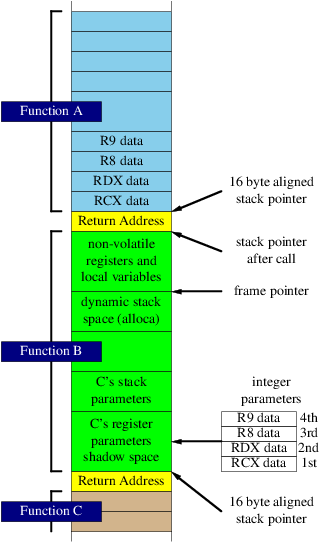
The first four integer function parameters are passed (in left to right order) in the registers RCX, RDX, R8 and R9. Further integer parameters are passed on the stack by pushing them in right to left order (parameters to the left at lower addresses). Stack space is allocated for the four register parameters (“shadow space”) but their values are not stored by the calling function so the called function must do this if necessary. The called function effectively owns this space and can use it for any purpose, so the calling function cannot rely on its contents on return. Register parameters occupy the least significant ends of registers and shadow space must be allocated for four register parameters even if the called function doesn’t have this many parameters.
The first four floating point parameters are passed in XMM0 to XMM3. When integer and floating point parameters are mixed, the correspondence between parameters and registers is not changed. Hence an integer parameter after two floating point ones will be in R8 with RCX and RDX unused.
When they are passed by value, structures and unions whose sizes are 8, 16, 32 or 64 bits are passed as if they are integers of the same size. Arrays and larger structures and unions are passed as pointers to memory allocated and assigned by the calling function.
The registers RAX, RCX, RDX, R8, R9, R10, R11 are volatile and can be freely used by a called function without preserving their values (note, however, that some may be used to pass parameters). In consequence functions cannot expect these registers to be preserved across calls to other functions.
The registers RBX, RBP, RSI, RDI, R12, R13, R14, R15, and XMM6 to XMM15 are non-volatile and must be saved and restored by functions that use them.
Except for floating point values, which are returned in XMM0, function return values that fit in 64 bits are returned in RAX. Some 128-bit values are also passed in XMM0 but larger values are returned in memory assigned by the calling program and pointed to by an additional “hidden” function parameter that becomes the first parameter and pushes other parameters to the right. This pointer value must also be passed back to the calling program in RAX when the called program returns.
Functions that allocate stack space, call other functions, save non-volatile registers or use exception handling are called “frame functions”; other functions are called “leaf functions”.
Frame functions use an area on the stack called a “stack frame” and have a defined prologue in which this is set up. Typically they save register parameters in their shadow locations (if needed), save any non-volatile registers that they use, allocate stack space for local variables, and establish a register as a stack frame pointer. They must also have one or more defined epilogues that free any allocated stack space and restore non-volatile registers before returning to the calling function.
Unless stack space is allocated dynamically, a frame function must maintain the 16 byte alignment of the stack pointer whilst outside its prologue and epilogue code (except during calls to other functions). A frame function that dynamically allocates stack space must first allocate any fixed stack space that it needs and then allocate and set up a register for indexed access to this area. The lower base address of this area must be 16 byte aligned and the register must be provided irrespective of whether the function itself makes explicit use of it. The function is then free to leave the stack unaligned during execution although it must re-establish the 16 byte alignment if or when it calls other functions.
Leaf functions do not require defined prologues or epilogues but they must not call other functions; nor can they change any non-volatile register or the stack pointer (which means that they do not maintain 16 byte stack alignment during execution). They can, however, exit with a jump to the entry point of another frame or leaf function provided that the respective stacked parameters are compatible.
These rules are summarized in Table 16.1 (function code that is not part of a prologue or an epilogue are referred to in the table as the function’s body).
Table 16.1. Function Structured Exception Handling Rules
| Function needs or can: | Frame Function with Frame Pointer Register | Frame Function without Frame Pointer Register | Leaf Function |
|---|---|---|---|
|
prologue and epilogue(s) |
yes |
yes |
no |
|
use exception handling |
yes |
yes |
no |
|
allocate space on the stack |
yes |
yes |
no |
|
save or push registers onto the stack |
yes |
yes |
no |
|
use non-volatile registers (after saving) |
yes |
yes |
no |
|
use dynamic stack allocation |
yes |
no |
no |
|
change stack pointer in function body |
yes [a] |
no |
no |
|
unaligned stack pointer in function body |
yes [a] |
no |
yes |
|
make calls to other functions |
yes |
yes |
no |
|
make jumps to other functions |
no |
no |
yes [b] |
|
[a] but 16 byte stack alignment must be re-established when any functions are called. [b] but the function parameters in registers and on the stack must be compatible. |
|||
As already indicated, frame functions must have a well defined structure including a prologue and one or more epilogues, each of a specific form. The code in a function that is not part of its prologue or its one or more epilogues will be referred to here as the function’s body.
A typical function prologue has the form:
    mov     [rsp+8],rcx         ; store parameter in shadow space if necessary
    push    r14                 ; save any non-volatile registers to be used
    push    r13                 ;
    sub     rsp,size            ; allocate stack for local variables if needed
    lea     r13,[bias+rsp]      ; use r13 as a frame pointer with an offset
When a frame pointer is needed the programmer can choose which register is used (“bias” will be explained later). Although it does not have to be used for access to the allocated space, it must be assigned in the prologue and remain unchanged during the execution of the body of the function.
If a large amount of stack space is used it is also necessary to call __chkstk with size in RAX prior to allocating this stack space in order
to add memory pages to the stack if needed (see the Microsoft Visual Studio 2005
documentation for further details).
The matching form of the epilogue is:
    lea     rsp,[r13-bias]      ; this is not part of the official epilogue
    add     rsp,size            ; the official epilogue starts here
    pop     r13
    pop     r14
    ret
The following can also be used provided that a frame pointer register has been established:
    lea     rsp,[r13+size-bias]
    pop     r13
    pop     r14
    ret
These are the only two forms of epilogue allowed. It must start either with an
add rsp,const instruction or with lea
rsp,[const+fp_register]; the first form can be used either with or without a frame
pointer register but the second form requires one. These instructions are then followed
by zero or more 8 byte register pops and a return instruction (which can be replaced with
a limited set of jump instructions as described in Microsoft documentation). Epilogue
forms are highly restricted because this allows the exception dispatch code to locate
them without the need for unwind data in addition to that provided for the prologue.
The data on the location and length of each function prologue, on any fixed stack allocation and on any saved non-volatile registers is recorded in special sections in the object code. Yasm provides macros to create this data that will now be described (with examples of the way they are used).
There are two types of stack frame that need to be considered in creating unwind data.
The first, shown at left in Figure 16.2, involves only a fixed allocation of space on the stack and results in a stack pointer that remains fixed in value within the function’s body except during calls to other functions. In this type of stack frame the stack pointer value at the end of the prologue is used as the base for the offsets in the unwind primitives and macros described later. It must be 16 byte aligned at this point.
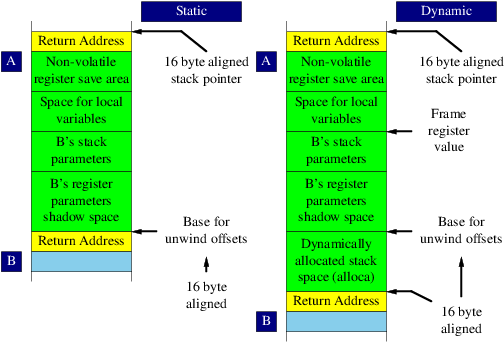
In the second type of frame, shown in Figure 16.2, stack space is dynamically allocated with the result that the stack pointer value is statically unpredictable and cannot be used as a base for unwind offsets. In this situation a frame pointer register must be used to provide this base address. Here the base for unwind offsets is the lower end of the fixed allocation area on the stack, which is typically the value of the stack pointer when the frame register is assigned. It must be 16 byte aligned and must be assigned before any unwind macros with offsets are used.
In order to allow the maximum amount of data to be accessed with single byte offsets (-128 to \+127) from the frame pointer register, it is normal to offset its value towards the centre of the allocated area (the “bias” introduced earlier). The identity of the frame pointer register and this offset, which must be a multiple of 16 bytes, is recorded in the unwind data to allow the stack frame base address to be calculated from the value in the frame register.
Here are the low level facilities Yasm provides to create unwind data.
proc_framename- Generates a function table entry in
.pdataand unwind information in.xdatafor a function’s structured exception handling data. [pushregreg]- Generates unwind data for the specified non-volatile register. Use only for
non-volatile integer registers; for volatile registers use an
[allocstack 8]instead. [setframereg,offset]- Generates unwind data for a frame register and its stack offset. The offset must be a multiple of 16 and be less than or equal to 240.
[allocstacksize]- Generates unwind data for stack space. The size must be a multiple of 8.
[saveregreg,offset]- Generates unwind data for the specified register and offset; the offset must be positive multiple of 8 relative to the base of the procedure’s frame.
[savexmm128reg,offset]- Generates unwind data for the specified XMM register and offset; the offset must be positive multiple of 16 relative to the base of the procedure’s frame.
[pushframecode]- Generates unwind data for a 40 or 48 byte (with an optional error code) frame used to store the result of a hardware exception or interrupt.
[endprolog]- Signals the end of the prologue; must be in the first 255 bytes of the function.
endproc_frame- Used at the end of functions started with
proc_frame.
Example 16.1 shows how these primitives are used (this is based on an example provided in Microsoft Visual Studio 2005 documentation).
Example 16.1. Win64 Unwind Primitives
PROC_FRAME      sample
    db          0x48            ; emit a REX prefix to enable hot-patching
    push        rbp             ; save prospective frame pointer
    [pushreg    rbp]            ; create unwind data for this rbp register push
    sub         rsp,0x40        ; allocate stack space
    [allocstack 0x40]           ; create unwind data for this stack allocation
    lea         rbp,[rsp+0x20]  ; assign the frame pointer with a bias of 32
    [setframe   rbp,0x20]       ; create unwind data for a frame register in rbp
    movdqa      [rbp],xmm7      ; save a non-volatile XMM register
    [savexmm128 xmm7, 0x20]     ; create unwind data for an XMM register save
    mov         [rbp+0x18],rsi  ; save rsi
    [savereg    rsi,0x38]       ; create unwind data for a save of rsi
    mov         [rsp+0x10],rdi  ; save rdi
    [savereg    rdi, 0x10]      ; create unwind data for a save of rdi
[endprolog]

    ; We can change the stack pointer outside of the prologue because we
    ; have a frame pointer.  If we didn't have one this would be illegal.
    ; A frame pointer is needed because of this stack pointer modification.

    sub         rsp,0x60        ; we are free to modify the stack pointer
    mov         rax,0           ; we can unwind this access violation
    mov         rax,[rax]

    movdqa      xmm7,[rbp]      ; restore the registers that weren't saved
    mov         rsi,[rbp+0x18]  ; with a push; this is not part of the
    mov         rdi,[rbp-0x10]  ; official epilog

    lea         rsp,[rbp+0x20]  ; This is the official epilog
    pop         rbp
    ret
ENDPROC_FRAME
From the descriptions of the YASM primitives given earlier it can be seen that there is a close relationship between each normal stack operation and the related primitive needed to generate its unwind data. In consequence it is sensible to provide a set of macros that perform both operations in a single macro call. Yasm provides the following macros that combine the two operations.
proc_framename- Generates a function table entry in
.pdataand unwind information in.xdata. alloc_stackn- Allocates a stack area of
nbytes. save_regreg,loc- Saves a non-volatile register
regat offsetlocon the stack. push_regreg- Pushes a non-volatile register
regon the stack. rex_push_regreg- Pushes a non-volatile register
regon the stack using a 2 byte push instruction. save_xmm128reg,loc- Saves a non-volatile XMM register
regat offsetlocon the stack. set_framereg,loc- Sets the frame register
regto offsetlocon the stack. push_eflags- Pushes the eflags register
push_rex_eflags- Pushes the eflags register using a 2 byte push instruction (allows hot patching).
push_framecode- Pushes a 40 byte frame and an optional 8 byte error code onto the stack.
end_prologue,end_prolog- Ends the function prologue (this is an alternative to
[endprolog]). endproc_frame- Used at the end of funtions started with
proc_frame.
Example 16.2 is Example 16.1 using these higher level macros.
Example 16.2. Win64 Unwind Macros
PROC_FRAME       sample         ; start the prologue
    rex_push_reg rbp            ; push the prospective frame pointer
    alloc_stack  0x40           ; allocate 64 bytes of local stack space
    set_frame    rbp, 0x20      ; set a frame register to [rsp+32]
    save_xmm128  xmm7,0x20      ; save xmm7, rsi & rdi to the local stack space
    save_reg     rsi, 0x38      ;    unwind base address:  [rsp_after_entry - 72]
    save_reg     rdi, 0x10      ;    frame register value: [rsp_after_entry - 40]
END_PROLOGUE
    sub          rsp,0x60       ; we can now change the stack pointer
    mov          rax,0          ; and unwind this access violation
    mov          rax,[rax]      ; because we have a frame pointer

    movdqa       xmm7,[rbp]     ; restore the registers that weren't saved with
    mov          rsi,[rbp+0x18] ; a push (not a part of the official epilog)
    mov          rdi,[rbp-0x10]

    lea          rsp,[rbp+0x20] ; the official epilogue
    pop          rbp
    ret
ENDPROC_FRAME
The chapters in this part of the book document Yasm’s support for various debugging formats.
The chapters in this part of the book document Yasm’s support for various instruction set architectures.
Table of Contents
The x86 architecture is the generic name for a multi-vendor 16-bit, 32-bit, and most recently 64-bit architecture. It was originally developed by Intel in the 8086 series of CPU, extended to 32-bit by Intel in the 80386 CPU, and extended by AMD to 64 bits in the Opteron and Athlon 64 CPU lines. While as of 2007, Intel and AMD are the highest volume manufacturers of x86 CPUs, many other vendors have also manufactured x86 CPUs. Generally the manufacturers have cross-licensed (or copied) major improvements to the architecture, but there are some unique features present in many of the implementations.
The x86 architecture has a variable instruction size that allows for moderate code compression while also allowing for very complex operand combinations as well as a very large instruction set size with many extensions. Instructions generally vary from zero to three operands with only a single memory operand allowed.
Different processors have different recommendations for the NOP (no operation) instructions used for padding in code. Padding is commonly
performed to align loop boundaries to maximize performance, and it is key that the
padding itself add minimal overhead. While the one-byte NOP 90h is standard across all x86 implementations, more recent generations
of processors recommend different variations for longer padding sequences for optimal
performance. Most processors that claim a 686 (e.g. Pentium Pro) generation or newer
featureset support the “long”
NOP opcode 0Fh 1Fh, although this opcode was undocumented
until recently. Older processors that do not support these dedicated long NOP opcodes
generally recommended alternative longer NOP sequences; while these sequences work as
NOPs, they can cause decoding inefficiencies on newer processors.
Because of the various NOP recommendations, the code generated by the Yasm
ALIGN directive depends on both the execution mode
(BITS) setting and the processor selected by the
CPU directive (see Section 21.2.1). Table 21.1 lists the various
combinations of generated NOPs.
Table 21.1. x86 NOP Padding Modes
BITS |
CPU |
Padding |
|---|---|---|
|
|
Any |
16-bit short NOPs |
|
|
None given, or less than |
32-bit short NOPs (no long NOPs) |
|
|
|
Intel guidelines, using long NOPs |
|
|
|
AMD K10 guidelines, using long NOPs |
|
|
None |
Intel guidelines, using long NOPs |
|
|
|
Intel guidelines, using long NOPs |
|
|
|
AMD K10 guidelines, using long NOPs |
In addition, the above defaults may be overridden by passing one of the options in
Table 21.2 to the CPU directive.
The x86 has been extended in many ways throughout its history, remaining mostly backwards compatible while adding execution modes and large extensions to the instruction set. A modern x86 processor can operate in one of four major modes: 16-bit real mode, 16-bit protected mode, 32-bit protected mode, and 64-bit long mode. The primary difference between real and protected mode is in the handling of segments: in real mode the segments directly address memory as 16-byte pages, whereas in protected mode the segments are instead indexes into a descriptor table that contains the physical base and size of the segment. 32-bit protected mode allows paging and virtual memory as well as a 32-bit rather than a 16-bit offset.
The 16-bit and 32-bit operating modes both allow for use of both 16-bit and 32-bit registers via instruction prefixes that set the operation and address size to either 16-bit or 32-bit, with the active operating mode setting the default operation size and the “other” size being flagged with a prefix. These operation and address sizes also affect the size of immediate operands: for example, an instruction with a 32-bit operation size with an immediate operand will have a 32-bit value in the encoded instruction, excepting optimizations such as sign-extended 8-bit values.
Unlike the 16-bit and 32-bit modes, 64-bit long mode is more of a break from the
“legacy” modes. Long mode
obsoletes several instructions. It is also the only mode in which 64-bit registers are
available; 64-bit registers cannot be accessed from either 16-bit or 32-bit mode. Also,
unlike the other modes, most encoded values in long mode are limited to 32 bits in size.
A small subset of the MOV instructions allow 64 bit encoded
values, but values greater than 32 bits in other instructions must come from a register.
Partly due to this limitation, but also due to the wide use of relocatable shared
libraries, long mode also adds a new addressing mode: RIP-relative.
The NASM parser allows setting what subsets of instructions and operands are accepted
by Yasm via use of the CPU directive (see Section 5.8). As the x86 architecture has a
very large number of extensions, both specific feature flags such as “SSE3” and CPU names such as “P4” can be specified. The feature flags
have both normal and “no”-prefixed versions to turn on and off a single feature, while
the CPU names turn on only the features listed, turning off all other features. Table 21.3 lists the feature flags, and
Table 21.4
lists the CPU names Yasm supports. Having both feature flags and CPU names allows for
combinations such as CPU P3 nofpu. Both feature flags and
CPU names are case insensitive.
Table 21.3. x86 CPU Feature Flags
| Name | Description |
|---|---|
|
|
Floating Point Unit (FPU) instructions |
|
|
MMX SIMD instructions |
|
|
Streaming SIMD Extensions (SSE) instructions |
|
|
Streaming SIMD Extensions 2 instructions |
|
|
Streaming SIMD Extensions 3 instructions |
|
|
Supplemental Streaming SIMD Extensions 3 instructions |
|
|
Streaming SIMD Extensions 4, Penryn subset (47 instructions) |
|
|
Streaming SIMD Extensions 4, Nehalem subset (7 instructions) |
|
|
All Streaming SIMD Extensions 4 instructions (both SSE4.1 and SSE4.2) |
|
|
Streaming SIMD Extensions 4a (AMD) |
|
|
Streaming SIMD Extensions 5 |
|
|
XSAVE instructions |
|
|
Advanced Vector Extensions instructions |
|
|
Fused Multiply-Add instructions |
|
|
Advanced Encryption Standard instructions |
|
|
PCLMULQDQ instruction |
|
|
3DNow! instructions |
|
|
Cyrix-specific instructions |
|
|
AMD-specific instructions (older than K6) |
|
|
System Management Mode instructions |
|
|
Protected mode only instructions |
|
|
Undocumented instructions |
|
|
Obsolete instructions |
|
|
Privileged instructions |
|
|
Secure Virtual Machine instructions |
|
|
VIA PadLock instructions |
|
|
Intel EM64T or better instructions (not necessarily 64-bit only) |
Table 21.4. x86 CPU Names
| Name | Feature Flags | Description |
|---|---|---|
|
|
|
Intel 8086 |
|
|
|
Intel 80186 |
|
|
|
Intel 80286 |
|
|
|
Intel 80386 |
|
|
|
Intel 80486 |
|
|
|
Intel Pentium |
|
|
|
Intel Pentium Pro |
|
|
|
Intel Pentium II |
|
|
|
Intel Pentium III |
|
|
|
Intel Pentium 4 |
|
|
|
Intel Itanium (x86) |
|
|
|
AMD K6 |
|
|
|
AMD Athlon |
|
|
|
AMD Athlon64 and Opteron |
|
|
|
Intel codename Prescott |
|
|
|
Intel codename Conroe |
|
|
|
Intel codename Penryn |
|
|
|
Intel codename Nehalem |
|
|
|
Intel codename Westmere |
|
|
|
Intel codename Sandy Bridge |
|
|
|
AMD codename Venice |
|
|
|
AMD codename K10 |
|
|
|
AMD codename Bulldozer |
In order to have access to 64-bit instructions, both a 64-bit capable CPU must be selected, and 64-bit
assembly mode must be set (in NASM syntax) by either using BITS
64 (see Section 5.1) or targetting a 64-bit object
format such as elf64.
The default CPU setting is for the latest processor and all feature flags to be enabled; e.g. all x86 instructions for any processor, including all instruction set extensions and 64-bit instructions.
The 64-bit x86 register set consists of 16 general purpose registers, only 8 of which
are available in 16-bit and 32-bit mode. The core eight 16-bit registers are AX, BX, CX,
DX, SI, DI, BP, and SP. The least significant 8 bits of the first four of these registers
are accessible via the AL, BL,
CL, and DL in all execution
modes. In 64-bit mode, the least significant 8 bits of the other four of these registers
are also accessible; these are named SIL, DIL, SPL, and BPL. The most significant 8 bits of the first four 16-bit registers are
also available, although there are some restrictions on when they can be used in 64-bit
mode; these are named AH, BH,
CH, and DH.
The 80386 extended these registers to 32 bits while retaining all of the 16-bit and
8-bit names that were available in 16-bit mode. The new extended registers are denoted by
adding a E prefix; thus the core eight 32-bit
registers are named EAX, EBX,
ECX, EDX, ESI, EDI, EBP,
and ESP. The original 8-bit and 16-bit register names map
into the least significant portion of the 32-bit registers.
64-bit long mode further extended these registers to 64 bits in size by adding a
R prefix to the 16-bit name; thus the base eight
64-bit registers are named RAX, RBX, etc. Long mode also added eight extra registers named numerically
r8 through r15. The least
significant 32 bits of these registers are available via a d suffix (r8d through
r15d), the least significant 16 bits via a w suffix (r8w through
r15w), and the least significant 8 bits via a b suffix (r8b through
r15b).
Figure 21.1 summarizes the full 64-bit x86 general purpose register set.
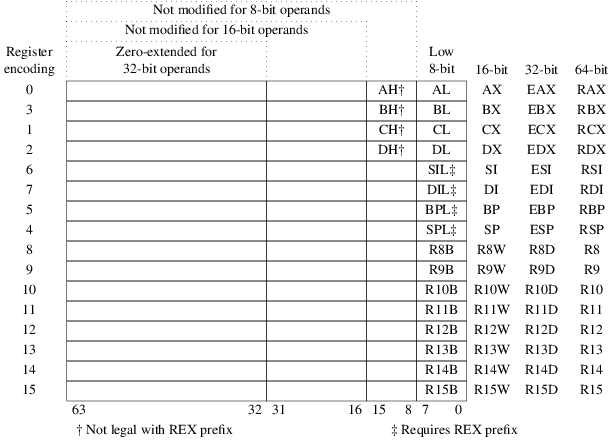
Symbols
- !=, %if: Testing Arbitrary Numeric Expressions
- $
-
- here, Expressions
- prefix, Layout of a NASM Source Line, Numeric Constants
- $$, Expressions, elf32 Special Symbols and WRT
- % operator, *, /, //, % and %%: Multiplication and Division
- %$, Context-Local Labels
- %$$, Context-Local Labels
- %%, Macro-Local Labels
- %% operator, *, /, //, % and %%: Multiplication and Division
- %+, Concatenating Single Line Macro Tokens: %+
- %+1, Condition Codes as Macro Parameters
- %-1, Condition Codes as Macro Parameters
- %0, Default Macro Parameters, %0: Macro Parameter Counter
- %assign, Preprocessor Variables: %assign
- %clear, Standard Macros
- %define, The Normal Way: %define
- %elif, Conditional Assembly, %if: Testing Arbitrary Numeric Expressions
- %elifctx, %ifctx: Testing the Context Stack
- %elifdef, %ifdef: Testing Single-Line Macro Existence
- %elifid, %ifid, %ifnum, %ifstr: Testing Token Types
- %elifidn, %ifidn and %ifidni: Testing Exact Text Identity
- %elifidni, %ifidn and %ifidni: Testing Exact Text Identity
- %elifmacro, %ifmacro: Testing Multi-Line Macro Existence
- %elifnctx, %ifctx: Testing the Context Stack
- %elifndef, %ifdef: Testing Single-Line Macro Existence
- %elifnid, %ifid, %ifnum, %ifstr: Testing Token Types
- %elifnidn, %ifidn and %ifidni: Testing Exact Text Identity
- %elifnidni, %ifidn and %ifidni: Testing Exact Text Identity
- %elifnmacro, %ifmacro: Testing Multi-Line Macro Existence
- %elifnnum, %ifid, %ifnum, %ifstr: Testing Token Types
- %elifnstr, %ifid, %ifnum, %ifstr: Testing Token Types
- %elifnum, %ifid, %ifnum, %ifstr: Testing Token Types
- %elifstr, %ifid, %ifnum, %ifstr: Testing Token Types
- %else, Conditional Assembly
- %endrep, Preprocessor Loops
- %error, %error: Reporting User-Defined Errors
- %exitrep, Preprocessor Loops
- %iassign, Preprocessor Variables: %assign
- %idefine, The Normal Way: %define
- %if, Conditional Assembly, %if: Testing Arbitrary Numeric Expressions
- %ifctx, %ifctx: Testing the Context Stack, Example Use of the Context Stack: Block IFs
- %ifdef, %ifdef: Testing Single-Line Macro Existence
- %ifid, %ifid, %ifnum, %ifstr: Testing Token Types
- %ifidn, %ifidn and %ifidni: Testing Exact Text Identity
- %ifidni, %ifidn and %ifidni: Testing Exact Text Identity
- %ifmacro, %ifmacro: Testing Multi-Line Macro Existence
- %ifnctx, %ifctx: Testing the Context Stack
- %ifndef, %ifdef: Testing Single-Line Macro Existence
- %ifnid, %ifid, %ifnum, %ifstr: Testing Token Types
- %ifnidn, %ifidn and %ifidni: Testing Exact Text Identity
- %ifnidni, %ifidn and %ifidni: Testing Exact Text Identity
- %ifnmacro, %ifmacro: Testing Multi-Line Macro Existence
- %ifnnum, %ifid, %ifnum, %ifstr: Testing Token Types
- %ifnstr, %ifid, %ifnum, %ifstr: Testing Token Types
- %ifnum, %ifid, %ifnum, %ifstr: Testing Token Types
- %ifstr, %ifid, %ifnum, %ifstr: Testing Token Types
- %imacro, Multi-Line Macros
- %include, Including Other Files
- %macro, Multi-Line Macros
- %pop, The Context Stack, %push and %pop: Creating and Removing Contexts
- %push, The Context Stack, %push and %pop: Creating and Removing Contexts
- %rep, TIMES: Repeating Instructions or Data, Preprocessor Loops
- %repl, %repl: Renaming a Context
- %rotate, %rotate: Rotating Macro Parameters
- %strlen, String Length: %strlen
- %substr, Sub-strings: %substr
- %undef, Undefining macros: %undef
- %xdefine, Enhancing %define: %xdefine
- %xidefine, Enhancing %define: %xdefine
- & operator, &: Bitwise AND Operator
- &&, %if: Testing Arbitrary Numeric Expressions
- * operator, *, /, //, % and %%: Multiplication and Division
- + modifier, Greedy Macro Parameters
- + operator
- - operator
- --mapfile, Map Files
- -f, __YASM_OBJFMT__ and __OUTPUT_FORMAT__: Output Object Format Keyword
- -P, Including Other Files
- ..@, Macro-Local Labels
- ..@ symbol prefix, Local Labels
- ..got, elf32 Special Symbols and WRT, elf64 Special Symbols and WRT, elfx32 Special Symbols and WRT
- ..gotoff, elf32 Special Symbols and WRT
- ..gotpc, elf32 Special Symbols and WRT
- ..gotpcrel, elf64 Special Symbols and WRT, elfx32 Special Symbols and WRT
- ..plt, elf32 Special Symbols and WRT, elf64 Special Symbols and WRT, elfx32 Special Symbols and WRT
- ..sym, elf32 Special Symbols and WRT, elf64 Special Symbols and WRT, elfx32 Special Symbols and WRT
- .COM, bin: Flat-Form Binary Output
- .comment, IDENT: Add file identification
- .drectve, win32 Extensions to the SECTION Directive
- .nolist, Disabling Listing Expansion
- .obj, win32: Microsoft Win32 Object Files
- .pdata, win64 Structured Exception Handling
- .SYS, bin: Flat-Form Binary Output
- .xdata, win64 Structured Exception Handling
- / operator, *, /, //, % and %%: Multiplication and Division
- // operator, *, /, //, % and %%: Multiplication and Division
- 16-bit mode
-
- versus 32-bit mode, BITS
- 32-bit, win32: Microsoft Win32 Object Files
- 32-bit mode
-
- versus 64-bit mode, BITS
- 32-bit shared libraries, elf32 Special Symbols and WRT
- 64-bit, elf64: Executable and Linkable Format 64-bit Object Files, win64: PE32+ (Microsoft Win64) Object Files
- 64-bit shared libraries, elf64 Special Symbols and WRT
- <, %if: Testing Arbitrary Numeric Expressions
- << operator, << and >>: Bit Shift Operators
- <=, %if: Testing Arbitrary Numeric Expressions
- <>, %if: Testing Arbitrary Numeric Expressions
- =, %if: Testing Arbitrary Numeric Expressions
- ==, %if: Testing Arbitrary Numeric Expressions
- >, %if: Testing Arbitrary Numeric Expressions
- >=, %if: Testing Arbitrary Numeric Expressions
- >> operator, << and >>: Bit Shift Operators
- ?, RESB and Friends: Declaring Uninitialized Data
- [MAP], Map Files
- ^ operator, ^: Bitwise XOR Operator
- ^^, %if: Testing Arbitrary Numeric Expressions
- __FILE__, __FILE__ and __LINE__: File Name and Line Number
- __LINE__, __FILE__ and __LINE__: File Name and Line Number
- __OUTPUT_FORMAT__, __YASM_OBJFMT__ and __OUTPUT_FORMAT__: Output Object Format Keyword
- __SECT__, The __SECT__ Macro, ABSOLUTE: Defining Absolute Labels
- __YASM_BUILD__, __YASM_MAJOR__, etc: Yasm Version
- __YASM_MAJOR__, __YASM_MAJOR__, etc: Yasm Version
- __YASM_MINOR__, __YASM_MAJOR__, etc: Yasm Version
- __YASM_OBJFMT__, __YASM_OBJFMT__ and __OUTPUT_FORMAT__: Output Object Format Keyword
- __YASM_SUBMINOR__, __YASM_MAJOR__, etc: Yasm Version
- __YASM_VERSION_ID__, __YASM_MAJOR__, etc: Yasm Version
- __YASM_VER__, __YASM_MAJOR__, etc: Yasm Version
- | operator, |: Bitwise OR Operator
- ||, %if: Testing Arbitrary Numeric Expressions
- ~ operator, Unary Operators: +, -, ~ and SEG
A
- ABS, RIP Relative Addressing, DEFAULT: Change the assembler defaults
- ABSOLUTE, ABSOLUTE: Defining Absolute Labels
- addition, + and -: Addition and Subtraction Operators
- address-size prefixes, Layout of a NASM Source Line
- after % sign, Concatenating Macro Parameters
- algebra, Effective Addresses
- ALIGN, ALIGN and ALIGNB: Data Alignment, bin Extensions to the SECTION Directive
-
- code, NOP Padding
- ALIGNB, ALIGN and ALIGNB: Data Alignment
- alignment
-
- code, NOP Padding
- in win32 sections, win32 Extensions to the SECTION Directive
- of common variables, ELF Extensions to the COMMON Directive
- alignment in elf, ELF Extensions to the COMMON Directive
- amd64, elf64: Executable and Linkable Format 64-bit Object Files, elfx32: ELF 32-bit Object Files for 64-bit Processors, x86 Architecture
- amdnop, NOP Padding
- arbitrary numeric expressions, %if: Testing Arbitrary Numeric Expressions
- around macro parameters, Multi-Line Macros
- Assembler Directives, NASM Assembler Directives
- assembly passes, Critical Expressions
- AT, ISTRUC, AT and IEND: Declaring Instances of Structures
B
- basicnop, NOP Padding
- bin, bin: Flat-Form Binary Output
- binary, Numeric Constants, + and -: Addition and Subtraction Operators
- Binary Files, INCBIN: Including External Binary Files
- Binary origin, ORG: Binary Origin
- Bit Shift, << and >>: Bit Shift Operators
- BITS, BITS
- bitwise AND, &: Bitwise AND Operator
- bitwise OR, |: Bitwise OR Operator
- bitwise XOR, ^: Bitwise XOR Operator
- Block IFs, Example Use of the Context Stack: Block IFs
- braces
-
- after % sign, Concatenating Macro Parameters
- around macro parameters, Multi-Line Macros
C
- CALL FAR, SEG and WRT
- case sensitive, The Normal Way: %define, Enhancing %define: %xdefine, Preprocessor Variables: %assign
- case-insensitive, %ifidn and %ifidni: Testing Exact Text Identity
- case-sensitive, Multi-Line Macros
- changing sections, Changing and Defining Sections
- character constant, DB and Friends: Declaring Initialized Data
- Character Constants, Character Constants
- circular references, The Normal Way: %define
- code, NOP Padding
- CodeView, cv8: CodeView Debugging Format for VC8
- coff, coff: Common Object File Format
- COFF
-
- debugging, stabs: Stabs Debugging Format
- colon, Layout of a NASM Source Line
- COMMON, COMMON: Defining Common Data Areas
- Common Object File Format, coff: Common Object File Format
- common variables, COMMON: Defining Common Data Areas
-
- alignment in elf, ELF Extensions to the COMMON Directive
- Concatenating Macro Parameters, Concatenating Macro Parameters
- Condition Codes as Macro Parameters, Condition Codes as Macro Parameters
- Conditional Assembly, Conditional Assembly
- conditional-return macro, Condition Codes as Macro Parameters
- Constants, Constants
- constants, Floating-Point Constants
- context stack, %ifctx: Testing the Context Stack
- Context Stack, The Context Stack, Example Use of the Context Stack: Block IFs
- Context-Local Labels, Context-Local Labels
- Context-Local Single-Line Macros, Context-Local Single-Line Macros
- counting macro parameters, %0: Macro Parameter Counter
- CPU, CPU: Defining CPU Dependencies
- CPUID, Character Constants
- creating contexts, %push and %pop: Creating and Removing Contexts
- critical expression, RESB and Friends: Declaring Uninitialized Data, EQU: Defining Constants, Preprocessor Variables: %assign, ABSOLUTE: Defining Absolute Labels
- Critical Expressions, Critical Expressions
- cv8, cv8: CodeView Debugging Format for VC8
D
- data, ELF Extensions to the GLOBAL Directive
- DB, DB and Friends: Declaring Initialized Data, String Constants
- DD, DB and Friends: Declaring Initialized Data, String Constants, Floating-Point Constants
- DDQ, DB and Friends: Declaring Initialized Data
- DDQWORD, Layout of a NASM Source Line
- debugging, dwarf2: DWARF2 Debugging Format, stabs: Stabs Debugging Format
- Declaring Structure, STRUC and ENDSTRUC: Declaring Structure Data Types
- DEFAULT, RIP Relative Addressing, DEFAULT: Change the assembler defaults
- default, ELF Extensions to the GLOBAL Directive
- Default Macro Parameters, Default Macro Parameters
- Defining Sections, Changing and Defining Sections
- directives, ELF Directives
- Disabling Listing Expansion, Disabling Listing Expansion
- division, *, /, //, % and %%: Multiplication and Division
- DO, DB and Friends: Declaring Initialized Data
- DQ, DB and Friends: Declaring Initialized Data, String Constants, Floating-Point Constants
- DT, DB and Friends: Declaring Initialized Data, Floating-Point Constants
- DUP, TIMES: Repeating Instructions or Data
- DW, DB and Friends: Declaring Initialized Data, String Constants, Floating-Point Constants
- DWARF, dwarf2: DWARF2 Debugging Format
- dwarf2, dwarf2: DWARF2 Debugging Format
- DWORD, Layout of a NASM Source Line
E
- effective address, Effective Addresses
- effective addresses, Layout of a NASM Source Line
- effective-address, Critical Expressions
- elf, elf32: Executable and Linkable Format 32-bit Object Files, elf64: Executable and Linkable Format 64-bit Object Files
-
- directives, ELF Directives
- elf32, elf32: Executable and Linkable Format 32-bit Object Files
- elf64, elf64: Executable and Linkable Format 64-bit Object Files
- elfx32, elfx32: ELF 32-bit Object Files for 64-bit Processors
- SECTION, ELF Sections
- symbol size, SIZE: Set symbol size
- symbol type, TYPE: Set symbol type
- weak reference, WEAK: Create weak symbol
- ELF
-
- 32-bit shared libraries, elf32 Special Symbols and WRT
- 64-bit shared libraries, elf64 Special Symbols and WRT
- debugging, dwarf2: DWARF2 Debugging Format, stabs: Stabs Debugging Format
- x32 shared libraries, elfx32 Special Symbols and WRT
- elf32, elf32: Executable and Linkable Format 32-bit Object Files
- elf64, elf64: Executable and Linkable Format 64-bit Object Files
- elfx32, elfx32: ELF 32-bit Object Files for 64-bit Processors
- ENDSTRUC, STRUC and ENDSTRUC: Declaring Structure Data Types, ABSOLUTE: Defining Absolute Labels
- EQU, EQU: Defining Constants, Critical Expressions
- exact text identity, %ifidn and %ifidni: Testing Exact Text Identity
- Executable and Linkable Format, elf32: Executable and Linkable Format 32-bit Object Files
- Exporting Symbols, GLOBAL: Exporting Symbols
- Expressions, Expressions
- Extended Dynamic Object, xdf: Extended Dynamic Object Format
- EXTERN, EXTERN: Importing Symbols
F
- far pointer, SEG and WRT
- Flash, bin: Flat-Form Binary Output
- Flat-Form Binary, bin: Flat-Form Binary Output
- floating-point, Layout of a NASM Source Line, DB and Friends: Declaring Initialized Data
-
- constants, Floating-Point Constants
- FOLLOWS, bin Extensions to the SECTION Directive
- format-specific directives, NASM Assembler Directives
- forward references, Critical Expressions
- FreeBSD, elf32: Executable and Linkable Format 32-bit Object Files
- function, TYPE: Set symbol type, ELF Extensions to the GLOBAL Directive
G
- gdb, dwarf2: DWARF2 Debugging Format, stabs: Stabs Debugging Format
- GLOBAL, GLOBAL: Exporting Symbols, ELF Extensions to the GLOBAL Directive
- global offset table, elf32 Special Symbols and WRT
- GOT, elf32 Special Symbols and WRT, elf64 Special Symbols and WRT, elfx32 Special Symbols and WRT
- graphics, INCBIN: Including External Binary Files
- Greedy Macro Parameters, Greedy Macro Parameters
- groups, SEG and WRT
H
- here, Expressions
- hex, Numeric Constants
- hidden, ELF Extensions to the GLOBAL Directive
I
- IDENT, IDENT: Add file identification
- IEND, ISTRUC, AT and IEND: Declaring Instances of Structures
- Immediates, Immediate Operands
- Importing Symbols, EXTERN: Importing Symbols
- in win32, win32 Extensions to the SECTION Directive
- in win32 sections, win32 Extensions to the SECTION Directive
- INCBIN, INCBIN: Including External Binary Files, String Constants
- Including Other Files, Including Other Files
- infinite loop, Expressions
- informational section, win32 Extensions to the SECTION Directive
- Initialized, DB and Friends: Declaring Initialized Data
- Instances of Structures, ISTRUC, AT and IEND: Declaring Instances of Structures
- Intel number formats, Floating-Point Constants
- intelnop, NOP Padding
- internal, ELF Extensions to the GLOBAL Directive
- ISTRUC, ISTRUC, AT and IEND: Declaring Instances of Structures
- iterating over macro parameters, %rotate: Rotating Macro Parameters
L
- label prefix, Local Labels
- library, WEAK: Create weak symbol
- Linux
- little-endian, Character Constants
- LMA, bin Extensions to the SECTION Directive
- Local Labels, Local Labels
- logical AND, %if: Testing Arbitrary Numeric Expressions
- logical OR, %if: Testing Arbitrary Numeric Expressions
- logical XOR, %if: Testing Arbitrary Numeric Expressions
M
- Mac OSX, macho32: Mach 32-bit Object File Format, macho64: Mach 64-bit Object File Format
- Mach-O, macho32: Mach 32-bit Object File Format, macho64: Mach 64-bit Object File Format
- macho
- macho32, macho32: Mach 32-bit Object File Format
- macho64, macho64: Mach 64-bit Object File Format
- macro processor, The NASM Preprocessor
- Macro-Local Labels, Macro-Local Labels
- macros, TIMES: Repeating Instructions or Data
- Map file, Map Files
- memory reference, Effective Addresses
- Microsoft Visual Studio 2010, VSYASM - Yasm for Microsoft Visual Studio 2010
- modulo operators, *, /, //, % and %%: Multiplication and Division
- MSBUILD, VSYASM - Yasm for Microsoft Visual Studio 2010
- multi-line macro existence, %ifmacro: Testing Multi-Line Macro Existence
- Multi-Line Macros, Multi-Line Macros
- multi-line macros, Overloading Multi-Line Macros
- multiplication, *, /, //, % and %%: Multiplication and Division
- multipush, %rotate: Rotating Macro Parameters
N
- NOP, NOP Padding
- NOSPLIT, Effective Addresses
- numeric constant, DB and Friends: Declaring Initialized Data
- Numeric Constants, Numeric Constants
O
- object, TYPE: Set symbol type
- octal, Numeric Constants
- of common variables, ELF Extensions to the COMMON Directive
- of symbols, SIZE: Set symbol size, TYPE: Set symbol type, ELF Extensions to the GLOBAL Directive
- omitted parameters, Default Macro Parameters
- one’s complement, Unary Operators: +, -, ~ and SEG
- operand-size prefixes, Layout of a NASM Source Line
- operands, Layout of a NASM Source Line
- operators, Expressions
- ORG, ORG: Binary Origin
- Origin, ORG: Binary Origin
- orphan-labels, Layout of a NASM Source Line
- overlapping segments, SEG and WRT
- overloading
-
- multi-line macros, Overloading Multi-Line Macros
- single-line macros, The Normal Way: %define
- OWORD, Layout of a NASM Source Line
P
- padding, NOP Padding
- paradox, Critical Expressions
- passes, Critical Expressions
- PE, win32: Microsoft Win32 Object Files
- PE32+, win64: PE32+ (Microsoft Win64) Object Files
- period, Local Labels
- PIC, elf32 Special Symbols and WRT, elf64 Special Symbols and WRT
- PIC-specific, elf32 Special Symbols and WRT, elf64 Special Symbols and WRT, elfx32 Special Symbols and WRT
- PLT, elf32 Special Symbols and WRT, elf64 Special Symbols and WRT, elfx32 Special Symbols and WRT
- Position-Independent Code, elf32 Special Symbols and WRT, elf64 Special Symbols and WRT, elfx32 Special Symbols and WRT
- pre-define, The Normal Way: %define
- precedence, Expressions
- preferred, SEG and WRT
- prefix, Layout of a NASM Source Line, Numeric Constants
- preprocessor, EQU: Defining Constants
- Preprocessor Loops, Preprocessor Loops
- Preprocessor Variables, Preprocessor Variables: %assign
- primitive directives, NASM Assembler Directives
- procedure linkage table, elf32 Special Symbols and WRT, elf64 Special Symbols and WRT, elfx32 Special Symbols and WRT
- Processor Mode, Specifying Target Processor Mode
- protected, ELF Extensions to the GLOBAL Directive
- pseudo-instructions, Pseudo-Instructions
- PUBLIC, GLOBAL: Exporting Symbols
- pure binary, bin: Flat-Form Binary Output
Q
- QWORD, Layout of a NASM Source Line
R
- rdf, rdf: Relocatable Dynamic Object File Format
- RDOFF, rdf: Relocatable Dynamic Object File Format
- REL, RIP Relative Addressing, DEFAULT: Change the assembler defaults
- relational operators, %if: Testing Arbitrary Numeric Expressions
- Relocatable Dynamic Object File Format, rdf: Relocatable Dynamic Object File Format
- relocations
- removing contexts, %push and %pop: Creating and Removing Contexts
- renaming contexts, %repl: Renaming a Context
- Repeating, TIMES: Repeating Instructions or Data
- repeating code, Preprocessor Loops
- RESB, RESB and Friends: Declaring Uninitialized Data, Critical Expressions
- RESD, RESB and Friends: Declaring Uninitialized Data
- RESDQ, RESB and Friends: Declaring Uninitialized Data
- RESO, RESB and Friends: Declaring Uninitialized Data
- RESQ, RESB and Friends: Declaring Uninitialized Data
- REST, RESB and Friends: Declaring Uninitialized Data
- RESW, RESB and Friends: Declaring Uninitialized Data
- REX, BITS
- RIP, RIP Relative Addressing
- Rotating Macro Parameters, %rotate: Rotating Macro Parameters
S
- searching for include files, Including Other Files
- SECTION, SECTION and SEGMENT, ELF Sections, win32 Extensions to the SECTION Directive
-
- win32 extensions to, win32 Extensions to the SECTION Directive
- section alignment
- section.length, bin Special Symbols
- section.start, bin Special Symbols
- section.vstart, bin Special Symbols
- SEG, Unary Operators: +, -, ~ and SEG, SEG and WRT
- segment address, Unary Operators: +, -, ~ and SEG, SEG and WRT
- segment override, Layout of a NASM Source Line
- segmentation
-
- x86, Segmentation
- segments, SEG and WRT
- shift command, %rotate: Rotating Macro Parameters
- signed division, *, /, //, % and %%: Multiplication and Division
- signed modulo, *, /, //, % and %%: Multiplication and Division
- single-line macro existence, %ifdef: Testing Single-Line Macro Existence
- Single-line macros, The Normal Way: %define
- single-line macros, The Normal Way: %define
- size
- SIZE, SIZE: Set symbol size
- Solaris x86, elf32: Executable and Linkable Format 32-bit Object Files
- Solaris x86-64, elf64: Executable and Linkable Format 64-bit Object Files
- sound, INCBIN: Including External Binary Files
- specifying, SIZE: Set symbol size, TYPE: Set symbol type, ELF Extensions to the GLOBAL Directive
- square brackets, Effective Addresses
- stabs, stabs: Stabs Debugging Format
- Standard Macros, Standard Macros
- standard section names, win32 Extensions to the SECTION Directive
- standardised section names, Standardized Section Names
- STRICT, STRICT: Inhibiting Optimization
- string constant, DB and Friends: Declaring Initialized Data
- String Constants, String Constants
- String Handling in Macros, String Handling in Macros
- String Length, String Length: %strlen
- STRUC, STRUC and ENDSTRUC: Declaring Structure Data Types, ABSOLUTE: Defining Absolute Labels
- structured exceptions, win64 Structured Exception Handling
- Sub-strings, Sub-strings: %substr
- subtraction, + and -: Addition and Subtraction Operators
- switching between sections, Changing and Defining Sections
- symbol size, SIZE: Set symbol size
- symbol sizes
- symbol type, TYPE: Set symbol type
- symbol types
T
- testing
-
- arbitrary numeric expressions, %if: Testing Arbitrary Numeric Expressions
- context stack, %ifctx: Testing the Context Stack
- exact text identity, %ifidn and %ifidni: Testing Exact Text Identity
- multi-line macro existence, %ifmacro: Testing Multi-Line Macro Existence
- single-line macro existence, %ifdef: Testing Single-Line Macro Existence
- token types, %ifid, %ifnum, %ifstr: Testing Token Types
- TIMES, TIMES: Repeating Instructions or Data, Critical Expressions
- token types, %ifid, %ifnum, %ifstr: Testing Token Types
- two-pass assembler, Critical Expressions
- TWORD, Layout of a NASM Source Line
- type
- TYPE, TYPE: Set symbol type
U
- unary, Unary Operators: +, -, ~ and SEG
- Unary Operators, Unary Operators: +, -, ~ and SEG
- Uninitialized, RESB and Friends: Declaring Uninitialized Data
- UnixWare, elf32: Executable and Linkable Format 32-bit Object Files
- unrolled loops, TIMES: Repeating Instructions or Data
- unsigned division, *, /, //, % and %%: Multiplication and Division
- unsigned modulo, *, /, //, % and %%: Multiplication and Division
- unwind data, win64 Structured Exception Handling
- USE16, USE16, USE32, and USE64
- USE32, USE16, USE32, and USE64
- USE64, USE16, USE32, and USE64
- User-Defined Errors, %error: Reporting User-Defined Errors
- user-level assembler directives, Standard Macros
- user-level directives, NASM Assembler Directives
V
- Valid characters, Layout of a NASM Source Line
- VALIGN, bin Extensions to the SECTION Directive
- version control, IDENT: Add file identification
- version number of Yasm, __YASM_MAJOR__, etc: Yasm Version
- versus 32-bit mode, BITS
- versus 64-bit mode, BITS
- VFOLLOWS, bin Extensions to the SECTION Directive
- Vista, win32: Microsoft Win32 Object Files
- Vista x64, win64: PE32+ (Microsoft Win64) Object Files
- Visual Studio, win32: Microsoft Win32 Object Files, win64: PE32+ (Microsoft Win64) Object Files
- Visual Studio 2005, cv8: CodeView Debugging Format for VC8
- Visual Studio 2008, cv8: CodeView Debugging Format for VC8
- Visual Studio 2010, VSYASM - Yasm for Microsoft Visual Studio 2010
- VMA, bin Extensions to the SECTION Directive
- VSYASM, VSYASM - Yasm for Microsoft Visual Studio 2010
W
- WEAK, WEAK: Create weak symbol
- weak reference, WEAK: Create weak symbol
- win32, win32: Microsoft Win32 Object Files
- Win32, win32: Microsoft Win32 Object Files
- win32 extensions to, win32 Extensions to the SECTION Directive
- win64, win64: PE32+ (Microsoft Win64) Object Files
- Win64, win64: PE32+ (Microsoft Win64) Object Files
- Windows
- Windows XP, win32: Microsoft Win32 Object Files
- Windows XP x64, win64: PE32+ (Microsoft Win64) Object Files
- WRT, SEG and WRT, elf32 Special Symbols and WRT, elf64 Special Symbols and WRT
X
- x32, elfx32: ELF 32-bit Object Files for 64-bit Processors
- x32 shared libraries, elfx32 Special Symbols and WRT
- x64, win64: PE32+ (Microsoft Win64) Object Files
-
- structured exceptions, win64 Structured Exception Handling
- x86, x86 Architecture, Segmentation
- xdf, xdf: Extended Dynamic Object Format
Y
- Yasm Version, __YASM_MAJOR__, etc: Yasm Version